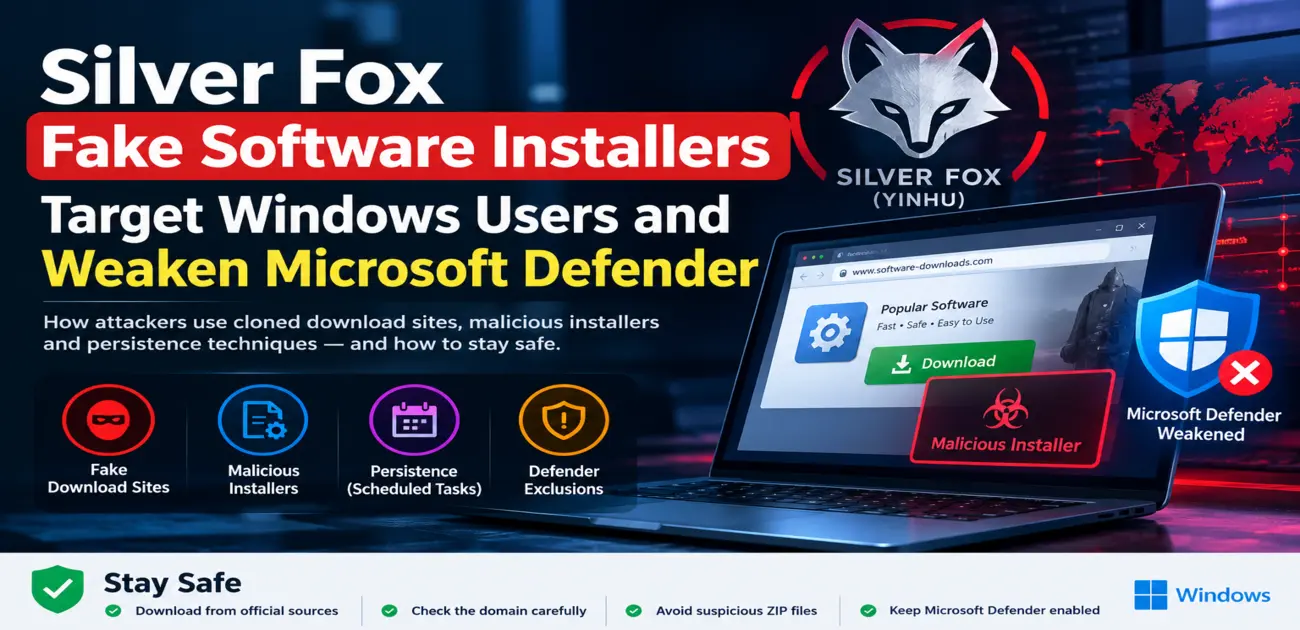
If you routinely download utility tools, drivers, or everyday desktop software from the internet, your browser might lead you directly into a malicious trap. A sophisticated cyber threat group is actively deploying Silver Fox fake software installers through cloned vendor websites, targeting Windows users across multiple global industries. Rather than exploiting unpatched software vulnerabilities, these deceptive downloads manipulate human trust to compromise corporate workstations and weaken built-in Windows security defenses.
According to threat intelligence telemetry released by Microsoft security analysts, the intrusion cluster primarily tracks the activity of a threat group publicly identified as Silver Fox (also documented by researchers under the moniker Yinhu). While analysts currently assess this connection with moderate confidence and stop short of attributing the operations to a state-sponsored entity, the collateral damage is already clear: organizations spanning healthcare, heavy manufacturing, logistics, gaming, government agencies, and higher education have already reported active intrusion attempts.
The lesson for both everyday users and enterprise administrators is uncompromising: brand recognition does not equate to download integrity. If you want to understand the foundational safeguards against such deceptive payloads, consult our dedicated playbook on how to prevent viruses and malicious code.
How Fake Software Installers Target Windows Users
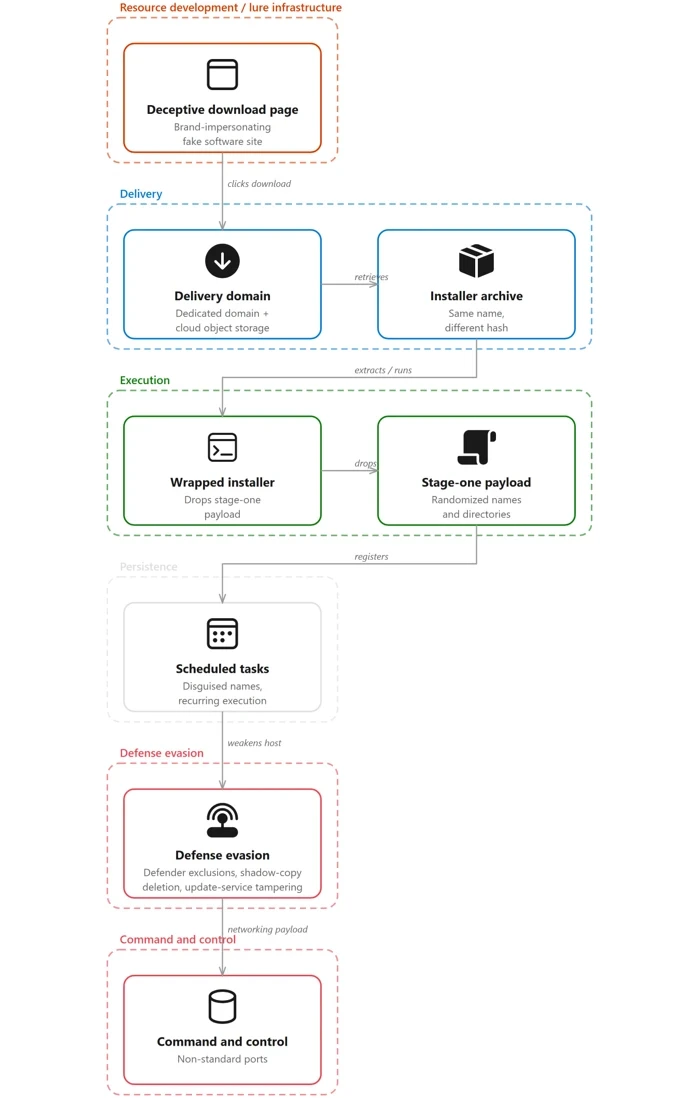
The intrusion chain begins when an unsuspecting user searches online for a reputable utility and lands on a convincing clone of a legitimate software distribution portal. Threat actors behind this operation have weaponized search engine results and lookalike domains using regional Chinese top-level infrastructures such as .com.cn and .hl.cn.
Security investigators identified fraudulent download portals masquerading as widely recognized hardware and software solutions, including Razer Synapse, Microsoft Edge, Kaspersky Lab, Sejda PDF, DiskGenius, Baidu Netdisk, oCam, draw.io, SteelSeries, Sogou Input, Calibre, and MindMaster. To an untrained eye, the site layout, logos, and prominent setup buttons appear indistinguishable from authentic manufacturer repositories.
Behind the scenes, the attackers employ polymorphic delivery tactics. When a victim clicks the download prompt, the server packages an installer archive. Analysts noted that identical-looking ZIP download links served completely distinct payload binaries within just 69 seconds of each request. This server-side dynamic compilation allows threat actors to evade standard hash-based antivirus signatures before the file even lands on the target drive.
From Compressed ZIP to Multi-Stage System Compromise
Once the archive reaches the desktop, the infection does not immediately trigger loud alarm bells. Opening the downloaded folder typically unleashes a wrapper binary that initiates a multi-tiered staging process.
In several documented intrusions, the attackers route payload delivery through legitimate Windows components, specifically utilizing the native Windows Installer engine, msiexec.exe. By relying on a digitally signed operating system binary to execute setup commands, the malicious software blends directly into standard corporate workstation noise. This stealthy execution model explains why inspecting only the file name or icon is never enough—verifying the actual publisher certificate and source URL is essential.
Attackers Weaponize Windows Task Scheduler for Long-Term Persistence
Dropping a payload is only half the battle; surviving a computer reboot is where attackers focus their engineering. To ensure persistent access, the installer abuses the native Windows Task Scheduler.
By scheduling periodic automated triggers, the malware routinely invokes secondary scripts and backdoors without requiring user re-authentication. If an internal security analyst simply kills the suspicious running task in Task Manager, the scheduled job will quietly spawn the infection again at the next designated interval.
For corporate SOC analysts, sudden additions to the Windows Task Scheduler—particularly those registered right after an employee runs a newly downloaded setup package—serve as one of the most reliable behavioral red flags of an active breach.
Active Tampering to Weaken Microsoft Defender
The most alarming phase of this intrusion chain occurs once the installer establishes local execution: it systematically works to weaken Microsoft Defender protections.
To prevent antivirus scanners from detecting secondary backdoors, the malware creates high-privilege scheduled tasks running under the NT AUTHORITY\SYSTEM context. Armed with these elevated rights, the installer executes automated commands that inject broad directory and file exclusions directly into Microsoft Defender Antivirus.
Once security exclusions are force-applied to key temporary folders, subsequent malicious files can sit and run on the host without ever triggering a behavioral quarantine. To learn more about the extensive internal destruction rogue software can cause once protections drop, read our technical breakdown on how malicious code can do damage.
Observed Malicious Behaviors Across Compromised Workstations
The Silver Fox campaign demonstrates that the attackers are not merely experimenting; their playbook includes post-exploitation capabilities designed to lock down unauthorized access across the entire local network:
- Unauthorized modification of Microsoft Defender Antivirus scanning exclusions
- Automated creation of persistent Scheduled Tasks to withstand host restarts
- Memory injection into legitimate processes to dodge endpoint detection and response (EDR)
- Deletion of Windows Volume Shadow Copies (VSS) to impair system rollbacks
- Disabling and terminating native Windows Update and background maintenance services
- Command-and-control beacons routed through compromised external cloud staging
- Reconnaissance and lateral movement probing via internal Server Message Block (SMB) protocols
By crippling volume snapshots, adversaries strip victims of quick recovery points, while terminating update services prevents the machine from receiving vital hotfixes and definition patches. If your machine is already struggling with patching issues, see our troubleshooting guide on fixing Windows update errors to restore your operating system update services.
Why Deceptive Download Portals Still Succeed
Cybersecurity teams often invest heavily in perimeter firewalls and zero-day defense, yet this campaign succeeds purely by manipulating user intent and trust.
When an employee actively seeks out software to complete a workplace task, their psychological guard is down. Clicking a download button feels like routine work. Because the user willingly authorizes the setup process and grants administrative elevation, traditional security boundaries fail to stop the initial breach.
These deceptive landing pages mirror the core manipulation tactics found in phishing campaigns. While trained staff know how to spot a suspicious message via practical phishing email examples, organizations must extend that same skepticism to search engine results and software download domains.
Attribution Context: Decoding the Silver Fox Threat Cluster
While Microsoft attributes this activity to the Silver Fox cluster (Yinhu) with moderate confidence, analysts emphasize that definitive nation-state attribution remains unconfirmed. Threat actors frequently trade source code, reuse cloud hosting providers, and borrow staging infrastructure, meaning that common malware families alone do not prove government backing.
Parallel investigations by Kaspersky researchers highlighted an overlapping campaign distributing the ValleyRAT backdoor disguised inside a modified QN Wallpaper program. In those intrusions, attackers executed their malware via DLL sideloading—placing a rogue library alongside a legitimate, signed application.
Our ongoing threat intelligence reporting previously documented how DLL sideloading campaigns weaponize trusted processes, illustrating how easily adversaries disguise malicious backdoors inside authentic corporate tools.
Understanding the ValleyRAT Backdoor Threat
The primary secondary payload linked to this threat infrastructure is ValleyRAT, a highly modular remote access trojan engineered for prolonged espionage and device surveillance.
Once settled into memory, ValleyRAT enables attackers to harvest comprehensive hardware profiles, log keystrokes, siphon clipboard data, capture real-time desktop screenshots, adjust command-and-control server addresses, and drop additional exploitation plugins on demand.
Because the backdoor is frequently launched through signed components or living-off-the-land techniques, identifying its footprint requires proactive behavioral telemetry rather than static signature scanning alone.
Practical Defense Checklist for Windows Users
Individual users and remote workers should treat every software installation as a critical security transaction. Implement these daily habits immediately:
- Rely Exclusively on Official Vendor Domains: Never download utilities from search engine ad links, software aggregator portals, or third-party mirrors.
- Scrutinize the Browser URL: Verify the domain name closely before initiating a download, paying special attention to suspicious country-code extensions or typo-squatted brand names.
- Treat ZIP-Packaged Installers with Skepticism: Established software publishers typically provide digitally signed setup packages rather than raw executables buried inside generic zip archives.
- Never Disable Microsoft Defender: If a setup guide or installer prompt instructs you to turn off real-time protection, terminate the installer immediately.
- Reject Antivirus Exclusion Requests: Legitimate business software will never require you to whitelist arbitrary temporary folders in your security software.
- Verify Digital Signatures: Right-click the downloaded executable, navigate to Properties, and confirm that the digital signature matches the authentic software vendor.
Enterprise Detection and Incident Response Guidance
For corporate SOC engineers and network administrators, relying on file hashes in this campaign will lead to blind spots due to server-side payload regeneration. Enterprise monitoring should emphasize the following behavioral patterns:
- Outbound HTTP/HTTPS traffic originating from workstations to spoofed vendor landing pages
- Anomalous ZIP downloads immediately followed by executable creation in user app-data directories
- Unexpected process invocation of
msiexec.exewith non-standard command-line switches - Sudden registration of new scheduled tasks executing binaries out of writable user folders
- Event logs indicating PowerShell or command-line manipulation of Defender preferences via
Add-MpPreference -ExclusionPath - Spikes in Volume Shadow Copy deletion commands using
vssadmin.exe - Service stoppage events targeting Windows Defender Antivirus or Windows Update infrastructure
- Lateral movement beacons attempting unauthenticated SMB connections across internal workstation subnets
Security engineering teams can leverage existing frameworks inside our cybersecurity threat monitoring and APT vault to fine-tune behavioral rules across SIEM and EDR platforms.
Indicators of Compromise (Defanged)
The following indicators of compromise reflect active infrastructure observed in this campaign. All domains and IP endpoints have been intentionally defanged with square brackets to prevent accidental connection.
| Indicator Type | Observed Value | Threat Context |
|---|---|---|
| Lure Domain | pc-razerzone[.]com[.]cn | Spoofed Razer peripheral software portal |
| Lure Domain | app-microsoft-edge[.]com[.]cn | Spoofed Microsoft Edge browser download |
| Lure Domain | kaspersky-lab[.]hl[.]cn | Spoofed Kaspersky security download |
| Lure Domain | sejda[.]hl[.]cn | Spoofed Sejda PDF editor download |
| Delivery Host | gehie246[.]com | Active malicious payload staging infrastructure |
| Cloud Staging | newopt001[.]oss-cn-hongkong[.]aliyuncs[.]com | Observed cloud-hosted payload repository |
| C2 Domain | iualef[.]net | Active command-and-control communication hub |
| C2 Endpoint | 202.95.14[.]237:5090 | Direct IP-based command-and-control connection |
Note: Network defenders should ingest these values into their threat intelligence platforms, firewall blocklists, and DNS sinkholes to identify historical or ongoing compromise attempts.
Frequently Asked Questions
What is the Silver Fox fake software installer campaign?
It is an ongoing cyber threat operation that relies on counterfeit software websites distributing Silver Fox fake software installers to compromise Windows endpointsThe campaign targets users across multiple business sectors to install persistent backdoors and tamper with host security settings.
Does Microsoft officially attribute this campaign to Silver Fox?
Microsoft researchers track this intrusion cluster as consistent with the Silver Fox (Yinhu) threat actor group with moderate confidence. However, analysts note that no nation-state attribution has been established.
How do fake software installers bypass standard defenses?
Because the user voluntarily downloads and executes the installer, traditional perimeter blocks are bypassed. The attackers also leverage server-side payload regeneration to alter file hashes and abuse legitimate system binaries like msiexec to evade detection.
Can Microsoft Defender protect against these installers?
Yes, security vendors continue to update signatures and behavioral detection trees for observed payloads. However, because the malware attempts to insert administrative exclusions into Defender, endpoint administrators must monitor for unauthorized configuration changes.
What is the safest way to avoid downloading fake software?
Always manually navigate to the official domain of the application developer, avoid clicking promoted search engine advertisements, verify digital certificates before running installers, and never agree to disable antivirus software during a setup process.
Authoritative Research References
Microsoft Security Intelligence: Counterfeit installers to system compromise
Kaspersky Securelist: Tracking ValleyRAT and malicious adware campaigns
Verdict: Inspect the Source Before Authorizing Execution
The resurgence of the Silver Fox campaign emphasizes that attackers no longer need zero-day exploits when a persuasive lookalike website can convince users to infect themselves. By blending legitimate software names, dynamic server payloads, scheduled task persistence, and direct tampering with Microsoft Defender, the intrusion chain presents a serious risk to corporate networks.
For everyday computer users, defense comes down to digital discipline: verify the domain and digital signature before you click Download. For security operations teams, success relies on behavioral endpoint monitoring, strict application controls, and auditing security software exclusions. For further step-by-step guidance on keeping your endpoints hardened, explore our comprehensive guide on how to prevent viruses and malicious code.