Kali Linux 2026.3 has arrived with six new penetration testing tools, Linux kernel 7.1.5, KDE Plasma 6.7, and significant upgrades to its NetHunter mobile security platform.
Announced on October 26, 2026, the release introduces 126 package updates and improvements designed for security researchers, penetration testers, Linux administrators, and developers building customized security testing environments.
Among the new additions are Dalfox, Katana, Qsreplace, Rustscan, SDRangel, and Snaffler-ng. These tools support web application testing, network reconnaissance, software-defined radio research, and internal security assessments.
But the release is not limited to new tools. Kali’s image-building system introduces improved Docker and Podman support, while NetHunter adds smartwatch wardriving capabilities, expanded device compatibility, and improvements to NFC security research.
For existing Kali Rolling users, a clean installation is not required. The distribution can be upgraded through the official APT repositories.
Here is what you need to know about Kali Linux 2026.3, including its six new tools, major changes, installation options, and safe upgrade instructions.
Interested in learning Kali Linux for a cybersecurity career? Explore our cybersecurity career and salary guide to understand how Linux, networking, and security-testing skills connect to real-world security roles.
Key Highlights of Kali Linux 2026.3
- Six new security tools: Dalfox, Katana, Qsreplace, Rustscan, SDRangel, and Snaffler-ng.
- Linux kernel 7.1.5: An updated kernel with changes to core system functionality.
- 126 package updates: Refreshed software across the Kali ecosystem.
- KDE Plasma 6.7: Desktop improvements for productivity and multi-monitor workflows.
- Improved image-building scripts: Docker and Podman support for customized Kali images.
- NetHunter upgrades: Smartwatch wardriving, experimental WearHunter features, NFC Arsenal improvements, and additional device kernels.
- Documentation updates: New and revised installation and customization guidance.
- Rolling upgrade support: Existing installations can update without reinstalling Kali Linux.
Kali Linux 2026.3 Adds Six New Security Tools
One of the biggest attractions of Kali Linux 2026.3 is the addition of six tools to its official repositories.
These utilities cover different stages of authorized security assessments, including discovering network services, crawling websites, examining web parameters, analyzing radio signals, and reviewing sensitive files on accessible Windows shares.
Instead of manually downloading software from unverified sources, users can install these tools through Kali’s package-management system.
| Tool | Primary Purpose | Best For |
|---|---|---|
| Dalfox | Automated XSS assessment | Web application security |
| Katana | Website crawling and endpoint discovery | Web reconnaissance |
| Qsreplace | URL query parameter replacement | Web testing workflows |
| Rustscan | Fast TCP port discovery | Network security assessments |
| SDRangel | Software-defined radio research | Wireless signal analysis |
| Snaffler-ng | Finding sensitive files on accessible SMB shares | Internal security audits |
All six tools are available through Kali’s package repositories, meaning users do not need to rely on unofficial downloads to obtain them.
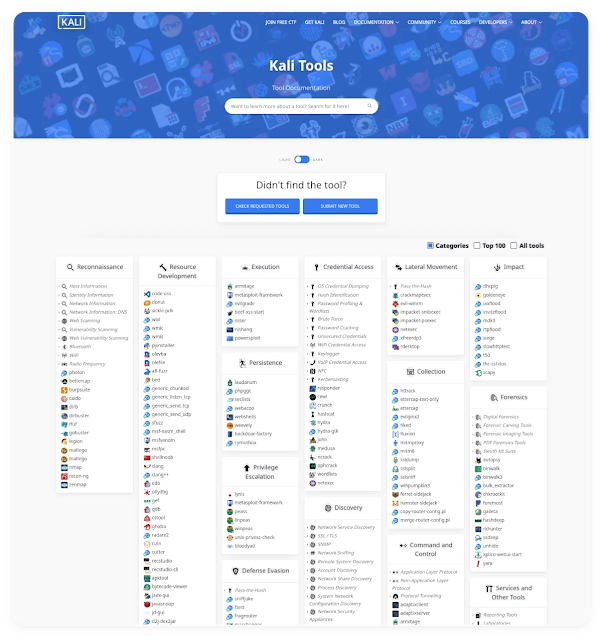
The Kali Tools directory groups utilities by purpose, making it easier for beginners and experienced researchers to find software relevant to a particular task.
The following sections explain what each new tool does and why it matters.
1. Dalfox: Automated Cross-Site Scripting Testing
Dalfox is a security tool that helps researchers identify and investigate potential cross-site scripting vulnerabilities in web applications.
Cross-site scripting, or XSS, occurs when a web application mishandles untrusted content and allows scripts to run in another user’s browser.
Identifying XSS weaknesses can involve testing multiple parameters, response contexts, and application behaviors.
Dalfox automates parts of that process, helping authorized testers investigate potentially vulnerable inputs more efficiently.
Why Dalfox Is Useful
- Supports automated XSS assessment workflows.
- Helps identify web parameters requiring investigation.
- Reduces repetitive manual testing.
- Assists developers with validating input-handling protections.
Automated findings still require independent validation. A reflected parameter or suspicious scanner result does not automatically prove that a working XSS vulnerability exists.
2. Katana: Web Crawling and Endpoint Discovery
Katana is a web crawling framework that helps security teams understand the structure of web applications.
Before testing an application, researchers need to identify its reachable pages, endpoints, scripts, and parameters.
Modern websites often load content dynamically, making manual discovery difficult.
Katana helps automate the collection of accessible URLs and related resources.
Why Katana Matters
- Discovers reachable web application endpoints.
- Helps map complex application structures.
- Supports modern website reconnaissance.
- Reduces time spent manually collecting URLs.
For bug bounty hunters and penetration testers, better endpoint visibility can improve assessment coverage.
However, discovering an endpoint is not the same as finding a vulnerability. Each relevant result still needs appropriate investigation.
3. Qsreplace: Simplifying URL Parameter Testing
Qsreplace is a command-line utility that replaces values within URL query strings.
During web security assessments, researchers often collect large lists of URLs containing parameters.
Manually modifying these parameters can be time-consuming and error-prone.
Qsreplace simplifies the process by accepting URLs through standard input and replacing query-string values consistently.
Key Benefits
- Automates URL parameter replacement.
- Works with standard command-line input and output.
- Supports repeatable testing workflows.
- Can be combined with other authorized assessment tools.
It is a supporting utility rather than a standalone vulnerability scanner, but it can improve the efficiency of routine security testing.
4. Rustscan: Fast Network Port Discovery
Rustscan is a port scanner written in Rust that focuses on identifying open TCP ports quickly.
Open ports help administrators understand which services are reachable on a system.
During authorized assessments, security engineers can use this information to identify services that need further examination.
Rustscan can also integrate with Nmap workflows, allowing researchers to follow port discovery with more detailed service inspection.
Why Rustscan Is Important
- Offers fast TCP port discovery.
- Helps identify exposed network services.
- Supports integration with Nmap.
- Reduces repetitive reconnaissance work.
Fast scanning must still respect organizational testing policies, authorization requirements, and acceptable traffic limits.
An open port is not automatically a vulnerability. Risk depends on the service, configuration, access controls, and software version.
5. SDRangel: Software-Defined Radio Research
SDRangel provides a graphical interface for working with software-defined radio hardware.
Software-defined radio, or SDR, allows compatible devices to process radio signals using software-controlled functions.
The technology is used for wireless communications research, signal analysis, and authorized security testing.
SDRangel supports multiple SDR devices, although available features depend on the hardware and drivers.
Potential Research Uses
- Wireless signal observation and analysis.
- Radio communications experimentation.
- Authorized wireless security assessments.
- Testing compatible SDR hardware in laboratories.
Researchers must follow applicable laws when receiving or transmitting radio signals.
For Kali users interested in wireless research, SDRangel expands the available toolkit beyond conventional IP networking.
6. Snaffler-ng: Finding Sensitive Files on SMB Shares
Snaffler-ng focuses on identifying potentially sensitive files within accessible Windows SMB network shares.
Organizations frequently use shared folders for project documents, backups, configuration files, and collaboration.
When access permissions are overly broad, confidential information can become available to people who do not need it.
Snaffler-ng helps authorized security teams identify files and locations requiring further review.
Why Snaffler-ng Matters
- Supports internal file-share security assessments.
- Helps identify potentially sensitive accessible files.
- Assists with reviewing SMB share exposure.
- Supports structured reporting during security audits.
The primary defensive benefit is understanding whether sensitive information is exposed through legitimate file-sharing infrastructure.
Organizations should validate the permissions associated with findings and avoid collecting sensitive content unnecessarily.

The six additions join Kali’s much larger security toolkit. Researchers can choose software according to their assessment goals rather than treating every available utility as necessary for every task.
Linux Kernel 7.1.5 Arrives With 126 Package Updates
Beyond the new tools, Kali Linux 2026.3 introduces a kernel refresh.
The official release announcement identifies a move from Linux kernel 6.19 to version 7.1.5.
The Linux kernel manages essential operating-system functions, including memory, process scheduling, device communication, and hardware interaction.
Kernel updates can introduce improvements, but their effects vary by hardware and system configuration.
The release also includes 126 package updates, refreshing software used throughout the Kali ecosystem.
Security professionals should confirm that their tools, customized drivers, and automation scripts remain compatible after upgrading.
Specialized wireless adapters and third-party kernel modules may require additional testing following a kernel change.
For professional environments, testing the update during a maintenance window is preferable to making unverified changes immediately before a client engagement.
KDE Plasma 6.7 Improves the Kali Desktop Experience
Kali Linux 2026.3 also includes KDE Plasma 6.7.
One useful improvement concerns virtual-desktop behavior across multiple monitors.
Researchers can organize different activities across their screens, including documentation, terminal sessions, browser windows, and security dashboards.
The KDE update also introduces refinements involving performance, desktop usability, and system monitoring.
These changes can improve the experience for users who prefer a graphical workstation.
Important: Kali’s default desktop remains Xfce. KDE-specific improvements apply to installations running KDE Plasma rather than automatically appearing in every Kali environment.
Docker and Podman Support Improves Custom Kali Image Builds
For DevOps engineers and advanced Kali users, one of the most interesting changes involves the distribution’s image-building scripts.
Kali publishes the scripts used to generate installation images and other downloadable system images.
These scripts allow teams to customize images for particular hardware, laboratory environments, and security-testing workflows.
In Kali Linux 2026.3, the project continues improving the structure and consistency of the build process.
The refreshed scripts include a build-in-container.sh helper supporting Docker or Podman.
Why This Matters for DevOps Teams
- Helps make image-building workflows more reproducible.
- Reduces the need to install every build dependency directly on a workstation.
- Supports testing customized Kali images.
- Can simplify automation in suitable build environments.
However, the Kali team notes that not every image-building script has completed the transition.
Organizations with existing build pipelines should review changes and verify compatibility before modifying production automation.
Kali NetHunter 2026.3 Introduces Major Mobile Security Updates
Kali NetHunter is the project’s platform for supported Android devices and mobile security research.
The 2026.3 release introduces improvements involving smartwatches, wireless assessment, NFC functionality, and device compatibility.
1. TicWatch Pro 3 Wardriving Support
The release introduces wardriving support for the TicWatch Pro 3 series.
An updated libnexmonkali library enables supported internal Wi-Fi monitoring capabilities through the watch’s Kali environment.
For researchers, this creates new possibilities for portable wireless-security assessments with compatible hardware.
The feature requires an appropriate device and configuration. It is not universal support for all smartwatches.
2. Experimental WearHunter Controller
WearHunter is an experimental project that allows a supported NetHunter smartwatch to be managed through a connected phone.
Its initial capabilities include command execution and application installation using supported ADB connectivity.
Additional functionality may follow as the project develops.
3. NFC Arsenal Improvements
The release improves NFC functionality within supported NetHunter environments.
On compatible devices, NFC capabilities can be accessed from the Kali chroot environment.
This provides additional options for legitimate NFC research and security assessments.
4. KernelSU and Additional Device Support
NetHunter receives KernelSU integration and additional supported device kernels.
Supported hardware includes selected devices from Google, Motorola, Sony, and several other manufacturers.
Compatibility depends on the exact model, Android build, and kernel.
Users should always confirm official device compatibility before flashing custom software or kernels.
How to Upgrade to Kali Linux 2026.3
Existing Kali Rolling users can upgrade through the official repositories without reinstalling the operating system.
Before beginning, back up important files, check available disk space, and review customized repositories or packages.
Step 1: Check the Current Kali Version
cat /etc/os-release
uname -r
These commands display the installed distribution information and the currently running kernel.
Step 2: Verify the Official Kali Repository
Confirm that the installation uses the official Kali Rolling repository.
For customized systems, compare the existing package-source configuration with Kali’s current documentation before making changes.
Do not replace a working repository configuration with unverified third-party instructions.
Step 3: Refresh Package Information
sudo apt updateIf APT reports repository, dependency, or signature errors, resolve them before continuing.
Step 4: Upgrade Installed Packages
sudo apt full-upgradeAPT displays proposed package installations, removals, and replacements.
Review the changes carefully before approving the operation, especially when using custom drivers or third-party tools.
Step 5: Restart When Required
After the update, reboot if the kernel or another component requires it.
Save open work and stop active testing sessions before restarting the system.
Step 6: Verify the Updated Installation
cat /etc/os-release
uname -r
Confirm that the reported Kali version and running kernel reflect the expected update.
Kernel strings may differ according to architecture and package state.
If the system still shows an older release, investigate its repository configuration and package-manager output.
How to Install the Six New Kali Linux Tools
Users interested in the new tools can install them through Kali’s official package repositories.
Refresh the package index:
sudo apt updateThen install the six packages:
sudo apt install dalfox katana qsreplace rustscan sdrangel snaffler-ngReview the proposed package changes and dependencies before confirming.
Package availability depends on the configured repository and its current package index.
Installing the tools alone does not reproduce every other change included in Kali Linux 2026.3.
Kali Linux 2026.3 Download: Which Image Should You Choose?
Users can either upgrade an existing system or download a fresh installation image.
| Use Case | Recommended Option |
|---|---|
| Existing Kali Rolling user | Upgrade through APT |
| New laptop or desktop installation | Official installer image |
| Testing in a virtual machine | Official virtual-machine image |
| Customized security lab | Review official image-building scripts |
| Mobile security research | Supported NetHunter image |
Want to download Kali Linux 2026.3? Use Kali’s official website rather than an unknown third-party source.
Download Kali Linux 2026.3 — Official Installation Images
The official download page also provides guidance for installation choices and image verification.
What Security Teams Should Check Before Upgrading
Although Kali Linux is designed for security work, major updates still require practical testing.
- Wireless adapters: Verify monitor-mode and driver compatibility.
- Virtual machines: Test integrations used with VMware, VirtualBox, or QEMU.
- Custom scripts: Confirm security-testing automation still works.
- Third-party tools: Check dependencies and supported versions.
- Custom images: Review build-script changes before modifying pipelines.
- Active engagements: Avoid unnecessary upgrades during critical client assessments.
- Backups: Preserve important data and configurations before updating.
These precautions help prevent a security-tool update from unexpectedly disrupting an established workflow.
Confirmed vs Unknown: Kali Linux 2026.3
Confirmed in the Release Announcement
- Kali Linux 2026.3 was announced on October 26, 2026.
- Six tools were added to the Kali repositories.
- The release includes 126 package updates.
- The announced kernel version is 7.1.5.
- KDE Plasma 6.7 is included.
- Refreshed image-building scripts support Docker and Podman.
- NetHunter includes smartwatch, NFC, and device-support improvements.
- Existing Kali Rolling installations can upgrade using APT.
Not Guaranteed for Every Installation
- That every device receives identical performance improvements.
- That all third-party drivers work without adjustment.
- That every NetHunter feature supports every Android device.
- That all custom build pipelines remain backward-compatible.
- That every new tool is required for every assessment.
- That a Kali update fixes unrelated software vulnerabilities automatically.
CyberUpdates365 Analysis
Kali Linux 2026.3 matters to both penetration testers and engineers maintaining specialized security environments.
The six new tools are likely to attract attention, particularly Rustscan, Katana, and Dalfox, which fit common network and web security workflows.
However, the refreshed image-building process may be equally valuable to teams maintaining repeatable security labs.
For DevOps engineers, Docker and Podman support can reduce some of the complexity involved in building customized Kali images.
For security researchers, new official repository packages expand the range of available tools without requiring separate software download processes.
NetHunter’s smartwatch and wireless improvements also demonstrate continued investment in portable research environments.
Nevertheless, adding tools does not automatically improve cybersecurity outcomes.
Effective penetration testing requires understanding network protocols, Linux administration, web application behavior, and the difference between a suspicious finding and a confirmed vulnerability.
This matters particularly for beginners who may focus on memorizing tool commands without understanding the underlying technology.
Professional teams should evaluate the release through functionality, compatibility, and operational stability.
Testing upgrades, maintaining backups, and retaining recovery options are more reliable practices than changing a working environment without validation.
Kali Linux 2026.3 expands the research toolkit and improves image-building and mobile capabilities, but successful security work still depends on careful configuration, technical understanding, and responsible use.
Research Evidence
- Distribution: Kali Linux.
- Release: 2026.3.
- Official announcement: October 26, 2026.
- New tools: Dalfox, Katana, Qsreplace, Rustscan, SDRangel, and Snaffler-ng.
- Package updates: 126.
- Kernel version: 7.1.5.
- KDE version: Plasma 6.7.
- Image builds: Docker and Podman support.
- NetHunter: TicWatch Pro 3 wardriving, WearHunter, NFC Arsenal, KernelSU, and additional device kernels.
- Upgrade path: Official Kali Rolling APT repositories.
- Primary source: Kali Linux release announcement.
Frequently Asked Questions
When was Kali Linux 2026.3 released?
Kali Linux 2026.3 was officially announced on October 26, 2026.
What are the six new Kali Linux tools?
The six new tools are Dalfox, Katana, Qsreplace, Rustscan, SDRangel, and Snaffler-ng.
Which Linux kernel does Kali 2026.3 use?
The release announcement identifies Linux kernel 7.1.5.
Does Kali Linux 2026.3 include KDE Plasma 6.7?
Yes. KDE Plasma 6.7 is included, while Kali’s default desktop remains Xfce.
Can I upgrade without reinstalling Kali Linux?
Yes. Existing Kali Rolling installations can update using the official APT repositories.
How do I install the six new Kali tools?
After refreshing APT package information, install Dalfox, Katana, Qsreplace, Rustscan, SDRangel, and Snaffler-ng using their package names.
What is new in Kali NetHunter 2026.3?
The release introduces smartwatch wardriving support, experimental WearHunter capabilities, NFC Arsenal improvements, KernelSU integration, and additional device kernels.
Where should I download Kali Linux 2026.3?
Use Kali Linux’s official download page to obtain installation and virtual-machine images.
Final Takeaway
Kali Linux 2026.3 brings six new security tools, 126 package updates, Linux kernel 7.1.5, KDE Plasma 6.7, and improvements to NetHunter and customized image-building workflows.
Existing users should check compatibility, back up important data, and upgrade through the official Rolling repositories.
New users can download approved installation and virtual-machine images to explore the release.
Want to turn Kali Linux skills into a real cybersecurity career? Learning Linux, networking, security analysis, and incident investigation is more valuable than simply installing additional tools.
Our related guide explains the practical skills needed to progress toward professional security roles.
Read Next: How to Become a SOC Analyst in 2026 — Skills, Training and Career Roadmap →