
Are you experiencing high Windows 11 Weather app RAM usage? Microsoft’s default weather utility, a staple pinned to millions of taskbars worldwide, is facing intense scrutiny. Recent independent testing—and our own real-world benchmarks—have revealed that the seemingly simple application is quietly consuming up to 1.2GB of RAM just to display basic forecasts and radar maps.
The findings highlight an uncomfortable contradiction. While Microsoft has spent the last several months promising enhanced memory efficiency for Windows 11, one of its own bundled applications is actively working against those performance goals.
(Experiencing other Windows 11 issues? Read our guides on the Windows 11 BitLocker Recovery Loop Fix and the LegacyHive Windows Zero-Day Fix.)
Why is Windows 11 Weather app RAM usage so high?
The root cause of this massive memory footprint lies in how the application was engineered. Despite appearing as a lightweight, native Windows utility, the Weather app is essentially the MSN Weather website repackaged inside Microsoft’s WebView2 framework. This means the app renders its content using the exact same Chromium browser engine that powers Microsoft Edge.
When testers examined the app’s process tree within the Windows Task Manager, they discovered up to nine separate Chromium-based sub-processes running simultaneously in the background. Checking a simple daily forecast balloons into the equivalent of opening a full, heavy web browser session.
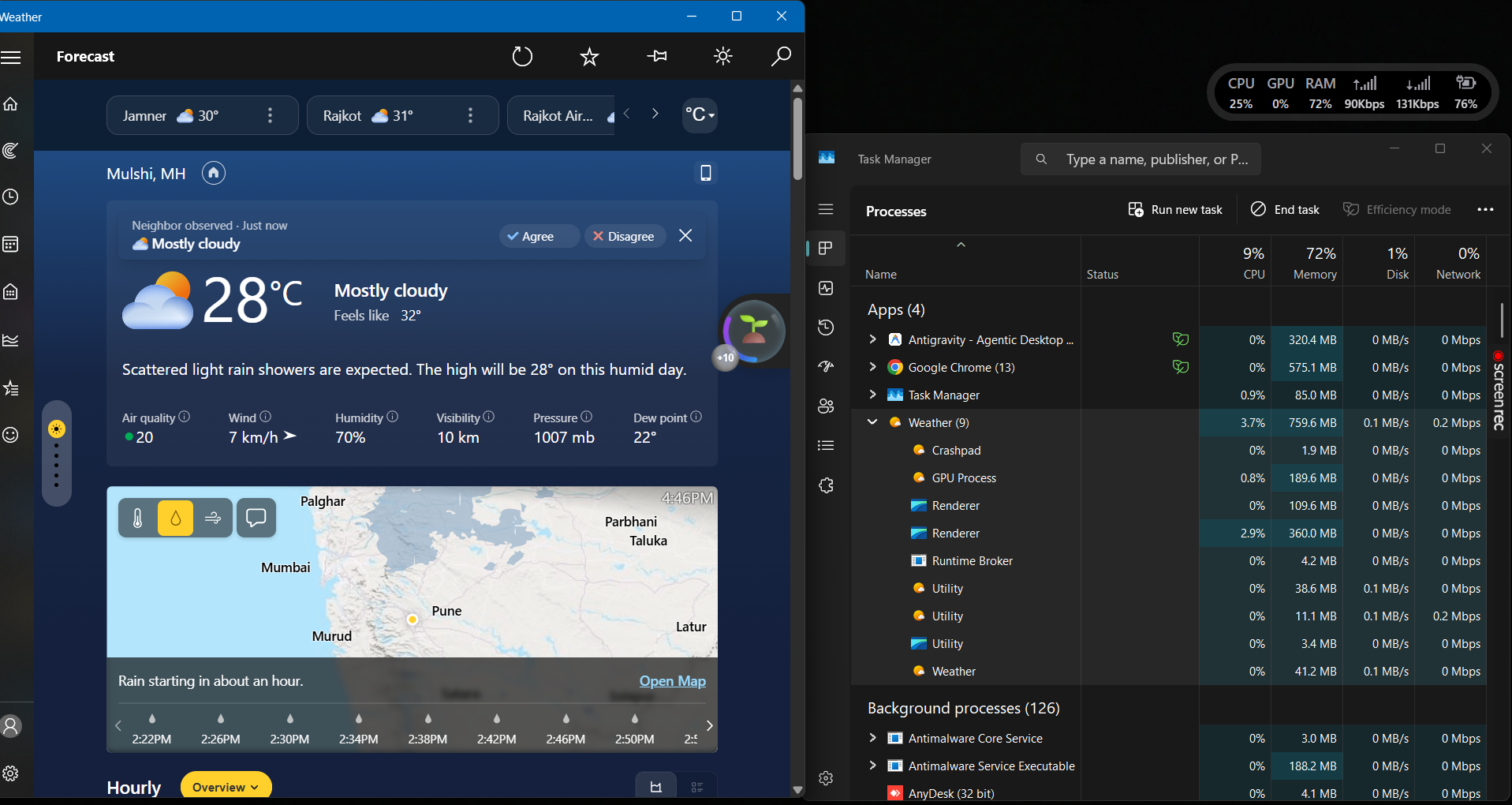
During our active testing, Windows 11 Weather app RAM usage jumped to 759.6 MB immediately upon launch. While the app settled around 500MB when sitting idle, memory usage violently spiked to 1.2GB—and up to 1.6GB—the moment users interacted with the interactive weather maps or navigated between forecast tabs.
Windows vs. macOS Weather App RAM Comparison
For high-end gaming PCs, a 1GB background process might go unnoticed. However, on budget laptops equipped with only 8GB of total RAM, a single background app absorbing nearly 20% of available memory severely degrades multitasking performance.
This inefficiency is especially clear when compared to Apple’s macOS ecosystem. Unlike Windows 11’s web-wrapper approach, Apple built a fully native desktop application.
| Operating System | App Architecture | Average RAM Usage | Contains Ads? |
|---|---|---|---|
| Windows 11 | WebView2 (Chromium Web Wrapper) | 750MB – 1.2GB | Yes (Native-looking Ads) |
| macOS (Apple) | Fully Native Desktop App | ~246MB | No |
(Concerned about overall OS security? Review our recent Windows 11 Recall Vulnerability Analysis.)
If you encounter broader interface crashes following cumulative servicing updates, follow our guide on resolving the Windows 11 Enterprise UI bug and black screen fix.
How to Fix Windows 11 Weather app RAM usage
Microsoft is reportedly aware of the backlash and may transition the Weather app away from the heavy WebView2 architecture by late 2026. However, until an official update arrives, you can immediately reclaim your RAM in 3 simple steps.
- Open Taskbar Settings: Right-click on an empty space on your Windows 11 Taskbar and select Taskbar settings.
- Locate the Widgets Toggle: Scroll down to the Taskbar items section where you will see the “Widgets” option (which controls the Weather app icon).
- Disable Widgets: Toggle the switch to Off. This immediately kills the background Chromium processes and frees up your RAM.
Alternatively, users seeking better performance are uninstalling the default application entirely and migrating to lightweight, third-party weather alternatives available in the Microsoft Store.
People Also Ask (FAQs)
What causes high Windows 11 Weather app RAM usage?
High Windows 11 Weather app RAM usage occurs because it is not a native application. It is built using Microsoft’s WebView2 framework, meaning it relies on a resource-heavy Chromium browser engine to render web pages and advertisements as if it were a desktop app.
Is the Windows 11 Weather app safe?
Yes, the Windows 11 Weather app is completely safe and is an official Microsoft product. The 9 background processes you see in Task Manager are normal for Chromium-based WebView2 apps, not malware. However, it is highly unoptimized for low-RAM systems.
Can I get my RAM back after closing the Weather app?
Yes. Because the app uses Chromium sub-processes, turning off the Widgets feature from the Taskbar settings will immediately kill the active processes, releasing the 500MB to 1.2GB of memory back to your system for other applications.