A newly analyzed Android remote-access Trojan called YuanKong can steal banking PINs and passwords, monitor screens, control infected phones remotely and abuse Android Wireless Debugging to gain shell-level access.
Researchers at STAR Labs analyzed 110 YuanKong droppers and identified 57 distinct child payloads linked to 42 operator accounts.
The malware does not primarily depend on SMS, contact-list or microphone permissions. Instead, it abuses Android Accessibility features, screen capture, overlays and local ADB access to observe and control what victims do inside legitimate apps.
That makes YuanKong particularly dangerous for banking, payment and other sensitive mobile applications.
For broader mobile-device security guidance, see our Device Security Audit 2026.
Key Takeaway
YuanKong is not just a simple banking Trojan.
It is a multi-tenant Android remote-control platform that gives operators the ability to watch screens, capture PINs and passwords, control taps and swipes, access files, read notifications and maintain persistent access.
STAR Labs found that multiple operators used the same underlying YuanKong codebase, signing certificate and command-and-control infrastructure while receiving separate account identifiers in their builds.
STAR Labs Found 110 YuanKong Droppers
Researchers analyzed a large collection of YuanKong samples and found:
- 110 droppers
- 57 distinct child payloads
- 42 operator accounts
- 44 rotating build brands
All 57 child payloads were signed with the same YuanKong certificate, giving defenders a strong family-level detection signal.
YuanKong Is a Multi-Tenant Malware Service
Each YuanKong build contains identifiers linked to the operator account that generated it.
STAR Labs found fields such as:
apkAccountIdapkAccountName- A per-build enrollment code
These values are compiled directly into the application rather than fetched only from the server.
The malware also sends the operator identity to its control infrastructure during device activity reporting.
This allowed researchers to map dozens of separate operator accounts without needing access to the YuanKong management panel.
The Dropper Hides a Second Android App
The initial YuanKong infection chain begins with a dropper APK.
The dropper contains an encrypted child application inside its assets.
However, the protection is weak.
STAR Labs found that the dropper stores both the encryption key and initialization value in a cleartext configuration file called:
assets/vault-config.jsonThe encrypted container uses a custom format labeled:
SVLT-XOR-v2Researchers determined that it is essentially a two-key XOR transformation rather than strong encryption.
That allowed the child APK to be extracted statically without executing the malware.
The Child App Is the YuanKong RAT
After unpacking, the child application identifies itself through classes and signing information associated with YuanKong.
STAR Labs found the Android application class:
com.remote.control.RemoteControlAppThe same certificate signed all 57 YuanKong payloads in the researchers’ dataset.
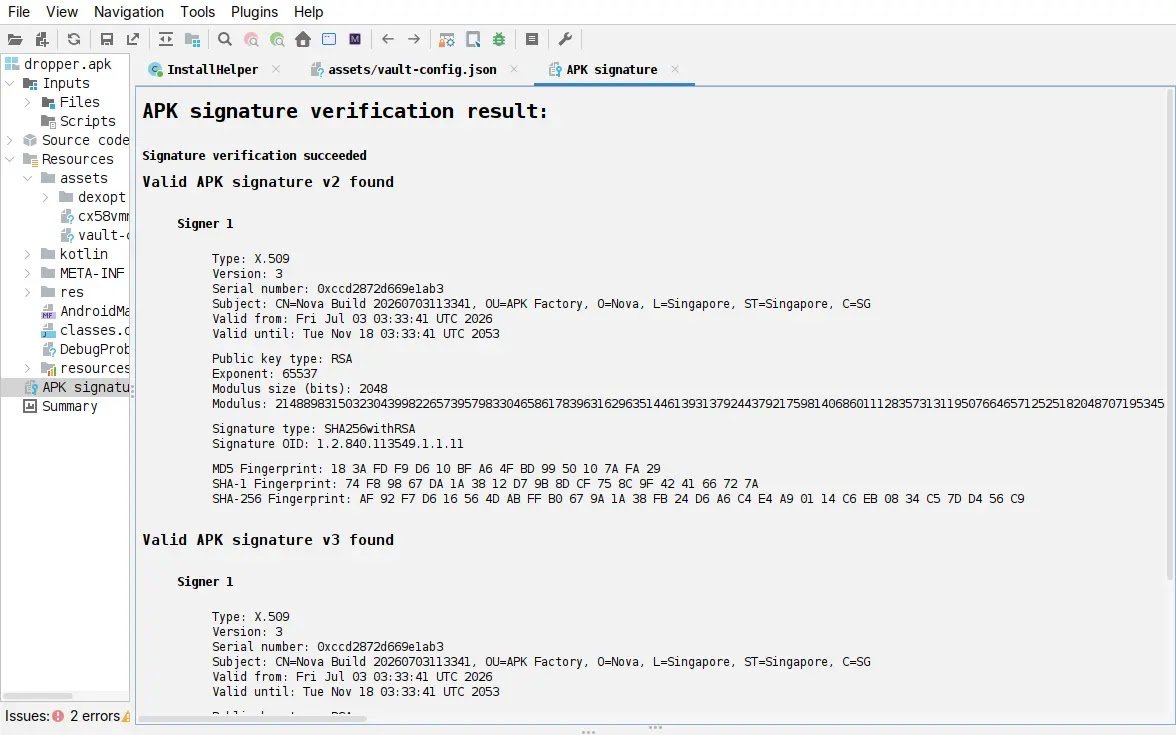
That shared certificate is one of the strongest indicators linking different YuanKong builds together.
YuanKong Watches the Screen Instead of Reading SMS
One unusual feature of YuanKong is what it does not request.
The analyzed application did not declare permissions for:
- Reading SMS messages
- Reading contacts
- Reading call logs
- Camera access
- Microphone access
Instead, the malware relies heavily on the Android Accessibility framework and screen-capture capabilities.
This allows it to monitor sensitive information while the victim interacts with legitimate applications.
YuanKong Can Read Password Fields
The malware can inspect Android’s Accessibility tree and read visible interface elements.
STAR Labs found functionality capable of identifying password fields and collecting text entered into applications.
That means credentials can potentially be captured even when the victim is using a legitimate login screen rather than a fake application.
Banking PINs Can Be Captured Several Ways
YuanKong includes multiple mechanisms for obtaining numeric PINs.
One method uses a fake numeric keypad overlay.
The victim sees what appears to be a normal PIN-entry screen, while the malware records the digits entered.
Another method maps the positions of numeric buttons on a genuine keypad.
By tracking the screen coordinates of the user’s touches, the malware can infer which digits were selected.
Payment Apps Can Be Covered With Fake Screens
YuanKong operators can also provide attacker-controlled web content that is displayed over selected applications.
A victim opening a payment or banking app may therefore see a fake login or PIN interface designed to mimic the legitimate application.
Credentials entered into that overlay can then be collected and sent to the attacker’s control server.
Remote Operators Can Control the Phone
YuanKong provides extensive remote-control capabilities.
STAR Labs identified commands that can:
- Click screen elements
- Perform long presses
- Swipe and gesture
- Enter text
- Press Back, Home and Recents
- Launch applications
- Lock the screen
- Capture screenshots
- Stream the display
- Black out the screen while operating
Accessibility gesture injection provides one method of controlling the interface.
YuanKong Can Read Notifications and OTPs
The malware also has functionality for reading and dismissing Android notifications.
This creates a potential path to collect one-time codes or authentication messages displayed through the notification system.
Unlike traditional banking malware that directly reads SMS databases, YuanKong can obtain sensitive notification content through its broader screen and Accessibility capabilities.
Clipboard, Files and Location Can Also Be Stolen
The YuanKong command set includes support for:
- Clipboard synchronization
- File listing
- File downloads
- File uploads
- File deletion
- File renaming
- Folder creation
- Location collection
This gives operators access to far more than banking credentials.
Wireless Debugging Gives YuanKong Shell-Level Access
One of YuanKong’s most advanced capabilities is its abuse of Android Wireless Debugging.
After obtaining Accessibility control, the malware can interact with Android system settings and enable Wireless Debugging.
It can then read the pairing information displayed by Android and pair with the phone’s local Android Debug Bridge service.
This provides access to the Android shell user.
It does not provide root access.
This Is Not an Android Root Exploit
The distinction between shell access and root access is important.
YuanKong does not need to exploit the Android kernel to gain root privileges in the behavior documented by STAR Labs.
Instead, it abuses legitimate debugging functionality that normally exists for developers.
Once paired with the local ADB service, the malware gains capabilities beyond those available to a normal Android application.
ADB Can Grant Powerful Settings Permissions
After pairing with local ADB, YuanKong can execute shell commands and grant itself additional permissions.
STAR Labs observed the malware using the shell context to obtain:
WRITE_SECURE_SETTINGSThis allows the malware to modify protected Android settings that ordinary applications cannot change directly.
YuanKong Installs a Persistence Daemon
The ADB shell also supports YuanKong’s persistence mechanisms.
The malware can install a daemon designed to remain active and help maintain control of the compromised phone.
The application also includes anti-uninstall capabilities and can hide its launcher icon.
These features make manual removal more difficult after the attack has progressed.
Screen Capture Uses Two Different Backends
STAR Labs found two mechanisms for collecting the phone’s screen.
One path uses Android’s MediaProjection API.
The malware can display an overlay intended to conceal the screen-sharing indicator while capture is active.
A second method uses the local ADB session to run Android’s own:
screenrecordcommand and stream H.264 video from the device.
YuanKong Communicates Over WebSocket
The malware maintains a persistent connection with command-and-control infrastructure using Socket.IO over WebSocket.
Messages are exchanged as typed JSON structures.
STAR Labs found no additional application-layer encryption protecting those messages.
Transport confidentiality instead relies on TLS.
Shared C2 Infrastructure Appears Across YuanKong Builds
Researchers identified a small group of shared command-and-control hosts across the YuanKong samples.
Important infrastructure includes:
apppanda[.]xyz
ktxapp[.]com
www[.]ktxapp[.]com
ktx123[.]net
www[.]ktx123[.]net
206[.]82[.]1[.]14
STAR Labs recommends these indicators as useful family-level hunting signals.
Package Names Can Change Frequently
Defenders should not rely only on application package names.
STAR Labs found that operators rotate brands and package identities between builds.
The shared YuanKong signing certificate and C2 infrastructure provide more stable detection anchors than a single app name.
Do Not Treat Seed Package Names as IoCs
The YuanKong configuration contains package-name strings that resemble well-known or imitation applications.
STAR Labs specifically warns that those strings are not confirmed YuanKong packages and are not C2 indicators.
They are used as seed values during device-identity generation.
Blocking them as malware indicators could therefore generate inaccurate detections.
How YuanKong Compares With RatHat
YuanKong shares several techniques with another advanced Android threat previously covered by CyberUpdates365.
RatHat Android malware also abuses Accessibility and Wireless Debugging to obtain local ADB shell access and steal banking PINs.
However, the two malware families are separate codebases and should not be treated as the same operation.
RatHat also includes additional behaviors such as SMS interception and a separate persistence architecture, while YuanKong’s analyzed samples rely more heavily on screen-based collection and Accessibility.
YuanKong Does Not Reveal the Initial Infection Method
One important gap remains in the STAR Labs research.
The analysis did not establish how victims are initially convinced to install the YuanKong droppers.
The researchers analyzed malware binaries and infrastructure rather than reconstructing a complete victim-delivery campaign.
That means phishing, malicious advertising or third-party APK distribution should not be stated as confirmed YuanKong infection vectors unless separate evidence emerges.
How Android Users Can Reduce the Risk
Users should be especially cautious when an unfamiliar Android app asks for powerful Accessibility permissions.
Recommended steps include:
- Install applications only from trusted sources
- Avoid manually installing APKs from unknown links
- Review enabled Accessibility services
- Disable unfamiliar Accessibility apps
- Keep Developer Options disabled when not needed
- Keep Wireless Debugging turned off
- Review apps with notification access
- Investigate apps that hide their launcher icons
- Keep Android and security updates current
What to Do if YuanKong Infection Is Suspected
If a device may be compromised, users should avoid changing sensitive passwords from the potentially infected phone.
Instead:
- Use a separate trusted device
- Contact banks through official phone numbers or apps
- Review recent transactions
- Change banking and email passwords
- Revoke suspicious sessions
- Review Accessibility and Developer settings
- Consider a full device reset if shell-level persistence is suspected
What Security Teams Should Monitor
Mobile-security teams should investigate:
- Unexpected Accessibility services
- Wireless Debugging being enabled without user intent
- Unknown local ADB pairing activity
- Unusual screen-capture behavior
- Apps hiding launcher icons
- Unexpected notification access
- Connections to YuanKong C2 infrastructure
- Applications signed with the shared YuanKong certificate
Frequently Asked Questions
What is YuanKong Android RAT?
YuanKong is an Android remote-access Trojan that provides screen monitoring, remote control, banking PIN capture, credential theft, file access and other surveillance capabilities.
Can YuanKong steal banking PINs?
Yes. STAR Labs found multiple PIN-capture mechanisms including fake keypads, overlay pages and touch-coordinate analysis.
Does YuanKong steal passwords?
The malware can inspect Android Accessibility data, including password fields and other on-screen content.
Does YuanKong read SMS messages?
The analyzed YuanKong samples did not request SMS-reading permissions. The malware instead relies heavily on Accessibility, screen capture and notification access.
Can YuanKong root an Android phone?
The behavior documented by STAR Labs gives YuanKong shell-level access through local ADB pairing, not root access.
How does YuanKong abuse Wireless Debugging?
The malware can use Accessibility to enable Wireless Debugging, read Android’s pairing information and pair with the local ADB service.
How many YuanKong operators were identified?
STAR Labs identified 42 distinct operator accounts across its dataset.
How many YuanKong samples were analyzed?
Researchers analyzed 110 droppers containing 57 distinct child payloads.
How does YuanKong spread?
The STAR Labs analysis did not establish a confirmed initial infection method.
Final Takeaway
YuanKong demonstrates how modern Android malware can steal sensitive financial information without relying on traditional SMS or contact-list permissions.
By combining Accessibility abuse, screen capture, overlays, remote gestures and local ADB pairing, the malware can closely monitor and control an infected phone.
The multi-tenant build system also shows that YuanKong is designed to support multiple operators using the same malware infrastructure.
Android users should treat unexpected Accessibility and Wireless Debugging requests as major warning signs, while security teams should hunt on the shared signing certificate and command-and-control infrastructure identified by STAR Labs.