CyberUpdates365 Threat Intelligence Desk: A detailed analysis of Meta’s latest multi-device cryptographic authentication rollout and what it means for end-user account protection.
By Uday Patil, Cybersecurity Analyst
Meta has officially rolled out a massive whatsapp security update 2026, fundamentally changing how billions of users protect their chat data. In a major shift against credential hijacking, WhatsApp now supports multiple passkeys tied to a single account across both iOS and Android platforms simultaneously.
As account takeover attacks become increasingly sophisticated, relying on a basic SMS one-time passcode is no longer sufficient. This update introduces phishing-resistant sign-ins and full alphanumeric passwords, providing enterprise-grade security to everyday users and finally rendering traditional SIM swapping attacks useless against the platform.
The Evolution of WhatsApp Authentication
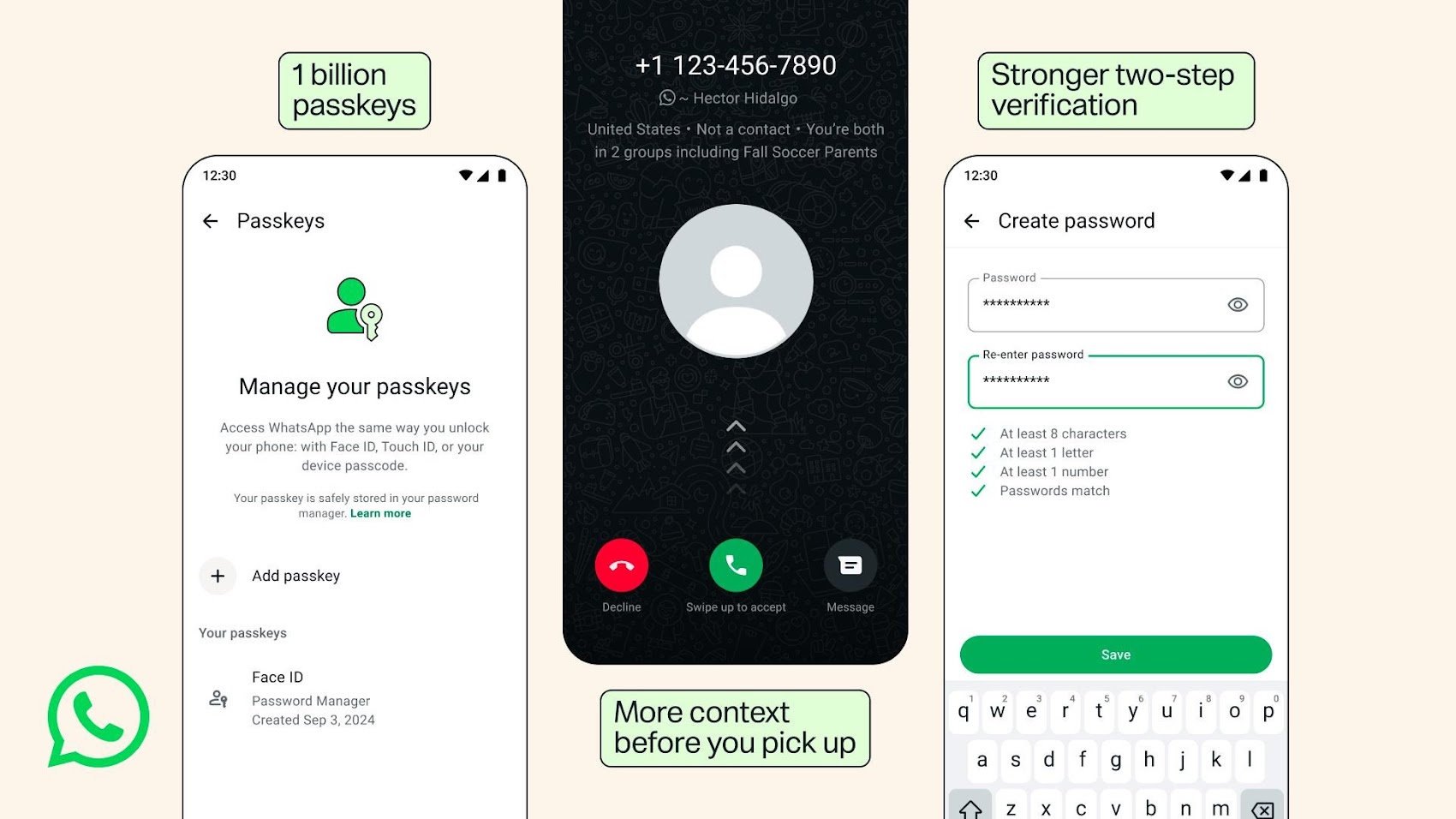
While passkey support was initially introduced for Android in late 2023 and iOS in 2024, users were previously restricted in how they managed these cryptographic keys across mixed ecosystems. With over 1 billion people already utilizing the feature, this expansion allows seamless and secure login management regardless of your device manufacturer.
By navigating to your account settings, you can now generate and store multiple hardware-bound passkeys. This is a crucial step in learning exactly how to protect whatsapp from hackers 2026.
Major Upgrades in the 2026 Security Rollout
The update brings three critical defense mechanisms to the messaging platform. Understanding these changes is vital for maintaining your digital privacy.
1. Multi-Device Passkey Support (The SS7 Killer)
Users can now register multiple passkeys across different devices (e.g., an iPhone, an iPad, and a Windows PC). Expert Security Insight: Historically, state-sponsored hackers and cybercriminals used SS7 protocol vulnerabilities or SIM Swapping to intercept the SMS verification code sent by WhatsApp. Because passkeys use public-key cryptography tied directly to your physical device’s biometric sensor (FaceID or Fingerprint), they completely bypass the vulnerable SMS network. Even if a hacker intercepts your text messages, they cannot log in without your physical device. (Related: Read our guide on defending against SIM Swapping and MFA Bypasses).
2. The End of the 6-Digit PIN
The traditional whatsapp two step verification password has received a massive overhaul. Previously limited to a simple 6-digit PIN (which automated tools could attempt to brute-force), Meta now allows users to configure a full, complex password.
According to WhatsApp’s official security advisory, the new system supports longer, alphanumeric strings including special characters. This exponentially increases the brute-force resistance of your account. If you are still using “123456”, this is your final warning to upgrade.
3. Advanced Caller Context for Scams
To combat the rise of social engineering, Android users will now see enriched context on incoming calls from unknown numbers. The app will display the caller’s origin country, whether they share common mutual groups, and if they have been previously flagged by the community.
Comparison: Old Security vs. 2026 Update
| Feature | Previous Implementation | 2026 Update Standard |
|---|---|---|
| Authentication | Single Passkey / SMS OTP | whatsapp ios android passkey support (Multiple) |
| Two-Step Verification | 6-Digit Numeric PIN | Full Alphanumeric Password + Special Characters |
| Unknown Callers | Basic Number Display | Deep Context (Groups, Origin, Trust Level) |
Actionable Guide: How to Add Multiple Passkeys on WhatsApp
Do not wait for an attack to happen. Follow these exact steps to lock down your account today:
- Step 1: Open WhatsApp and tap on Settings.
- Step 2: Navigate to Account, then select Passkeys.
- Step 3: Tap Create a passkey and follow your device’s biometric prompt to securely store the key.
- Step 4: Repeat this process on your secondary devices to ensure you never lose access if your primary phone is lost or stolen.
Frequently Asked Questions (FAQ)
How do I know if my WhatsApp is hacked?
The most common signs include receiving unexpected 2FA verification codes, seeing unknown linked devices in your “Linked Devices” settings, or noticing messages marked as read that you haven’t opened. The new whatsapp security update 2026 helps prevent this by enforcing hardware-bound passkeys.
Can someone hack my WhatsApp without my phone?
Previously, attackers could use SIM swapping to intercept your SMS code and hijack your account remotely. However, by learning how to add multiple passkeys on whatsapp, you tie your account to your physical device’s biometric sensor (FaceID/Fingerprint), making remote hijacking virtually impossible without your actual phone.
How to set a full alphanumeric password on WhatsApp?
To upgrade from the old 6-digit PIN, go to Settings > Account > Two-step verification. You will now see the option to input a full whatsapp two step verification password. We highly recommend using a mix of letters, numbers, and special characters.
What happens if I lose my phone with the passkey?
This is exactly why the whatsapp ios android passkey support update is so critical. Because you can now register multiple passkeys across different devices (like your iPad or secondary Android phone), losing your primary device won’t lock you out of your account. You can use your secondary device to log in safely.
Verdict and Security Summary
To implement complete privacy and device protection protocols across your organization, explore our comprehensive small business and consumer cybersecurity defense guide. The 2026 security rollout represents one of Meta’s most aggressive stances against credential theft to date. By forcing scammers to bypass complex alphanumeric passwords and hardware-bound passkeys, the barrier to entry for account hijacking has been raised significantly. Every user, especially those handling sensitive corporate data, should mandate the immediate adoption of these features across their organization.