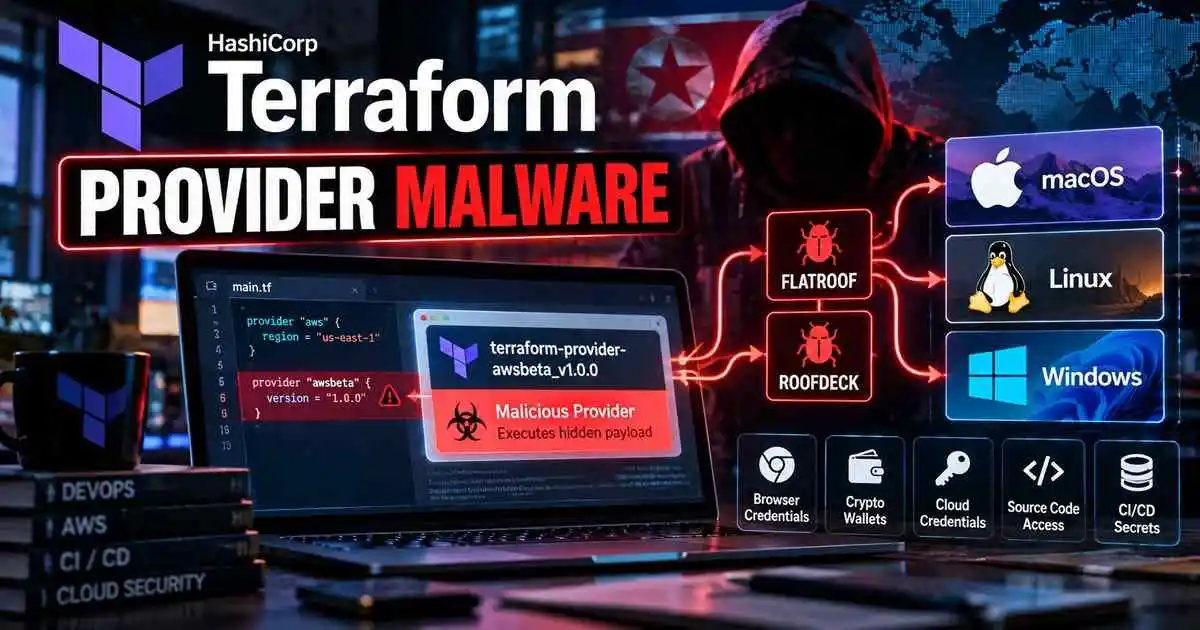
Terraform provider malware is being used in a sophisticated developer-focused campaign that delivers cross-platform backdoors and information stealers to macOS, Linux and Windows systems.
Zscaler ThreatLabz uncovered the campaign in July 2026 after identifying a trojanized Terraform provider named terraform-provider-awsbeta_v1.0.0 that masquerades as an Amazon Web Services-related plugin.
The malicious provider continues behaving like a normal Terraform component while silently launching a second-stage Bash loader that installs malware tailored to the victim’s operating system and CPU architecture.
The campaign deploys two major malware families, FLATROOF and ROOFDECK, which can steal browser credentials, cookies, cryptocurrency wallet data and other sensitive developer information while providing attackers with persistent remote access.
For broader coverage of state-linked and advanced persistent threat activity, see our Nation-State Cyber Warfare and APT Threats Hub.
Key takeaway: The attack weaponizes a trusted-looking Terraform provider, allowing malicious code to execute directly on developer workstations and CI/CD systems that may contain cloud credentials, source-code access and deployment permissions.
How the Terraform Provider Malware Campaign Works
The attack begins with a Go-based executable posing as a Terraform provider for Amazon Web Services.
Terraform providers are executable plugins that Terraform loads locally to communicate with cloud platforms, APIs and infrastructure services.
This makes them particularly sensitive from a security perspective because providers execute directly on developer machines or CI/CD runners.
According to Zscaler, the malicious provider contains enough legitimate-looking functionality to continue operating normally while an additional malicious package executes in the background.
Researchers said the exact initial delivery method remains unclear.
Malware Executes as Soon as Terraform Loads the Provider
The trojanized provider checks the system’s temporary directory for a file called session.lock.
If the file is not present, the provider:
- Determines the temporary directory.
- Downloads a second-stage Bash payload over HTTPS.
- Saves the script as
safari_updater. - Makes the file executable.
- Launches it through a shell process.
- Creates the lock file to prevent repeated execution.
The provider then continues responding normally, which can make the malicious behavior less obvious to the victim.
Fake HashiCorp Domain Makes the Download Look Legitimate
The Bash loader is downloaded from infrastructure using a HashiCorp-themed lookalike domain.
The URL path is designed to resemble a legitimate Terraform plugin or telemetry endpoint.
This approach can reduce suspicion because network traffic appears related to Terraform activity rather than an unrelated executable download.
Security teams should therefore avoid trusting domains simply because they contain familiar vendor names.
Attack Works Across macOS, Linux and Windows
The downloaded safari_updater script determines both the operating system and CPU architecture before selecting the appropriate payload.
Zscaler observed support for:
- macOS
- Linux
- Windows systems using compatible Unix-like shell environments
The loader then selects a payload specifically built for the victim platform.
This gives the campaign broad coverage across developer environments, where macOS and Linux systems are especially common.
Malware Payloads Are Disguised as Web Fonts
One of the campaign’s more unusual evasion methods involves distributing encrypted malware inside files that appear to be ordinary .woff web fonts.
The file names differ depending on operating system.
Examples observed by researchers included names resembling:
HiraginoSans-Regular.wofffor macOSMalgunGothic-Bold.wofffor WindowsNotoSansCJK-Bold.wofffor Linux
The files contain decoy font data followed by encrypted executable content.
The loader extracts and decrypts the hidden executable before running it.
Public GitHub and Vercel Infrastructure Used for Payload Delivery
The loader can retrieve the malware from multiple locations.
Zscaler identified delivery infrastructure including:
- A dynamic DNS host
- An attacker-controlled GitHub repository
- A Vercel-hosted site
Using well-known public hosting platforms can help malicious traffic blend in with normal developer activity.
This does not mean GitHub or Vercel themselves were compromised.
The attackers abused accounts and hosting services to distribute their payloads.
FLATROOF Backdoor Provides Cross-Platform Access
The first major malware family delivered in the campaign is FLATROOF.
Zscaler describes the analyzed variant as a Rust-based cross-platform backdoor with platform-specific installation and persistence mechanisms.
FLATROOF supports capabilities including:
- System discovery
- Process enumeration
- File management
- Command execution
- Payload downloads
- Data uploads
- Persistence management
- Configuration changes
- Self-removal
The malware also supports multiple command-and-control channels, giving attackers redundancy if one communication path stops working.
Browser Credentials and Cookies Are Major Targets
FLATROOF deploys operating system-specific Python scripts that collect sensitive information from browsers and the local system.
The stealers target browser databases containing:
- Saved login credentials
- Cookies
- Browsing history
- Autofill information
- Browser extension information
Firefox profile files are also specifically targeted, including credential and cookie databases.
The malware additionally collects shell history, running processes, installed applications, system information and usernames.
macOS Systems Face Keychain and Safari Theft
On macOS, the stealer can collect Safari-related information such as history, cookies, bookmarks and extension details.
It also targets the local login.keychain-db file.
Apple’s quarantine protections are also deliberately weakened during execution.
Zscaler observed the loader removing the quarantine attribute from downloaded files and applying an ad hoc code signature before execution.
Windows Malware Targets Crypto Wallet Extensions
The Windows variant expands the information-stealing capability further.
Researchers observed collection of:
- Chrome data
- Microsoft Edge data
- Brave browser data
- Windows Credential Manager entries
- PowerShell history
- Command Prompt history
The malware also searches for locally stored browser-extension data associated with cryptocurrency wallets including:
- MetaMask
- Phantom
- Trust Wallet
- Rabby
This makes cryptocurrency and Web3 developers particularly attractive targets.
Developer Systems Are High-Value Targets
Developer machines frequently contain access that ordinary employee endpoints do not.
A compromised cloud or DevOps workstation may expose:
- AWS or other cloud credentials
- API tokens
- Git repository access
- CI/CD secrets
- SSH keys
- Infrastructure deployment permissions
- Browser authentication sessions
- Cryptocurrency wallet information
Because Terraform is commonly used by cloud engineers and DevOps teams, a malicious provider can potentially execute inside highly privileged environments.
ROOFDECK Gives Attackers Deeper Remote Control
The campaign also deploys another malware family called ROOFDECK.
Zscaler identified Windows and macOS variants with extensive remote-control functionality.
ROOFDECK can perform:
- Host and disk discovery
- Filesystem enumeration
- Shell command execution
- Interactive reverse-shell access
- File upload and download
- File deletion and movement
- Clipboard access
- Background-task management
- Persistence installation
- Configuration updates
- Self-destruction
These features allow the attacker to maintain long-term access after the initial Terraform-based infection.
Pastebin and Nostr Used to Hide Command Servers
ROOFDECK includes a resilient command-and-control discovery system designed to make infrastructure harder to block.
The malware can locate its active C2 server through multiple methods.
It first checks locally stored configuration data.
If required, it can retrieve an encrypted server address from a Pastebin record.
The configuration is cryptographically signed, preventing defenders or unrelated third parties from simply replacing the address.
If the Pastebin lookup fails, the malware can query Nostr profile metadata to locate an updated dead-drop address.
Why Public Platforms Help Attackers Stay Resilient
Using services such as GitHub, Pastebin, Vercel and Nostr gives attackers several operational advantages.
- Traffic may resemble legitimate developer activity.
- Infrastructure can be updated without replacing the malware.
- Public platforms provide multiple fallback channels.
- Network defenders may be reluctant to block widely used services entirely.
This does not make these services malicious.
It demonstrates how attackers can abuse legitimate internet infrastructure for malware delivery and command discovery.
TraderTraitor Attribution Is Not High Confidence
Zscaler identified significant overlap between this campaign and activity historically linked to TraderTraitor.
The threat actor is also tracked under names including:
- Jade Sleet
- UNC4899
- Pressure Chollima
- Slow Pisces
TraderTraitor has previously been associated with attacks targeting cryptocurrency companies and developers.
However, Zscaler explicitly said it had not identified enough unique code similarities, shared infrastructure or cryptographic evidence to independently attribute this particular campaign to the group with high confidence.
The safest characterization is therefore suspected TraderTraitor-linked activity.
Campaign Overlaps With Earlier KelpDAO Activity
Zscaler also identified overlap with activity documented during the earlier KelpDAO incident.
Both FLATROOF and ROOFDECK were observed in related reporting.
Separate security research has also documented campaigns where cryptocurrency and Web3 developers were targeted through fake job interviews, developer tasks and weaponized software projects.
The repeated use of development tools as infection vectors reinforces the need to treat external code and infrastructure projects as untrusted until verified.
Why Terraform Provider Verification Matters
Terraform automatically executes provider binaries as part of normal infrastructure workflows.
That means developers should treat providers with the same caution as any other executable dependency.
A provider that appears to communicate with AWS, Azure or another cloud platform can still contain arbitrary malicious functionality.
Organizations should avoid installing providers based solely on file names, branding or instructions supplied through external projects.
How DevOps Teams Can Reduce the Risk
Security and DevOps teams can reduce exposure by strengthening Terraform dependency controls.
- Use approved Terraform providers only.
- Verify provider source addresses.
- Review Terraform dependency lock files.
- Validate provider checksums.
- Avoid manually executing unknown provider binaries.
- Restrict access to unofficial registries and lookalike domains.
- Review unexpected provider changes in pull requests.
- Run untrusted infrastructure projects inside isolated environments.
Monitor Terraform Processes Launching Shells
Terraform normally launching an unexpected shell process can be an important behavioral indicator.
Security teams should monitor for activity such as:
- Terraform processes spawning
shor Bash unexpectedly - Creation of suspicious files in temporary directories
- Unexpected
.woffdownloads from developer systems - Executables launching from unusual user-profile locations
- Connections to lookalike HashiCorp domains
- Cryptocurrency wallet directories being accessed by unrelated processes
CI/CD Runners Need the Same Protection
The threat is not limited to developer laptops.
Terraform is widely executed from automated CI/CD systems.
If a malicious provider runs inside a privileged pipeline, it may have access to:
- Cloud deployment credentials
- Environment variables
- CI/CD secrets
- Repository tokens
- Infrastructure configuration
Organizations should use isolated runners, short-lived credentials and least-privilege cloud roles wherever possible.
Key Indicators of Compromise
Zscaler published several host and network indicators associated with the campaign.
Notable filenames include:
terraform-provider-awsbeta_v1.0.0safari_updaterimagentupdate.exe
Observed infrastructure includes a HashiCorp-themed lookalike domain and attacker-controlled hosting locations used to distribute the encrypted payloads.
Organizations should use the complete indicator list from the primary Zscaler report in their SIEM, EDR and threat-intelligence platforms.
Frequently Asked Questions
What is Terraform provider malware?
In this campaign, attackers use a trojanized Terraform provider that behaves like a legitimate infrastructure plugin while also executing malicious code on the developer or CI/CD system running Terraform.
Which operating systems are targeted?
The campaign supports macOS, Linux and Windows environments.
What malware is delivered?
Zscaler observed FLATROOF and ROOFDECK malware families, along with supporting Python information-stealing components.
What information can FLATROOF steal?
It can collect browser passwords, cookies, browsing history, autofill data, shell history, system information and platform-specific credentials.
Does the malware target cryptocurrency wallets?
Yes. On Windows, researchers observed code targeting browser-extension data associated with MetaMask, Phantom, Trust Wallet and Rabby.
Is HashiCorp compromised?
No evidence in the Zscaler report indicates that HashiCorp itself was compromised. Attackers used a lookalike domain and a malicious provider pretending to be related to Terraform and AWS.
Is GitHub compromised?
No. The attackers used an attacker-controlled GitHub repository to host encrypted payloads. This represents abuse of the platform rather than a compromise of GitHub itself.
Is this definitely a North Korean attack?
No. Zscaler observed substantial overlap with TraderTraitor-linked activity but said it did not have sufficient independent evidence for high-confidence attribution.
How can Terraform users protect themselves?
Use trusted provider sources, verify checksums and lock files, restrict unapproved dependencies and isolate untrusted Terraform projects before executing them.
Final Takeaway
The Terraform provider malware campaign shows how trusted developer workflows can become highly effective malware delivery channels.
The trojanized provider executes automatically when Terraform loads it, while still presenting legitimate-looking provider functionality to the user.
Once active, FLATROOF can steal browser and credential data across macOS, Linux and Windows, while ROOFDECK provides persistent remote access and resilient command-and-control discovery.
For DevOps and cloud engineering teams, the key lesson is simple: Terraform providers are executable software and should be verified, controlled and monitored like any other privileged dependency.
Stay Updated on Developer Supply-Chain Threats
Attackers are increasingly targeting cloud engineers, developers and CI/CD environments because these systems often hold powerful credentials and deployment access.
Follow CyberUpdates365 for verified malware research, developer security threats, supply-chain attacks and practical cloud defense guidance.
Primary Source
Zscaler ThreatLabz:
Suspected TraderTraitor Group Uses Trojanized Terraform Provider to Deliver Cross-Platform Malware