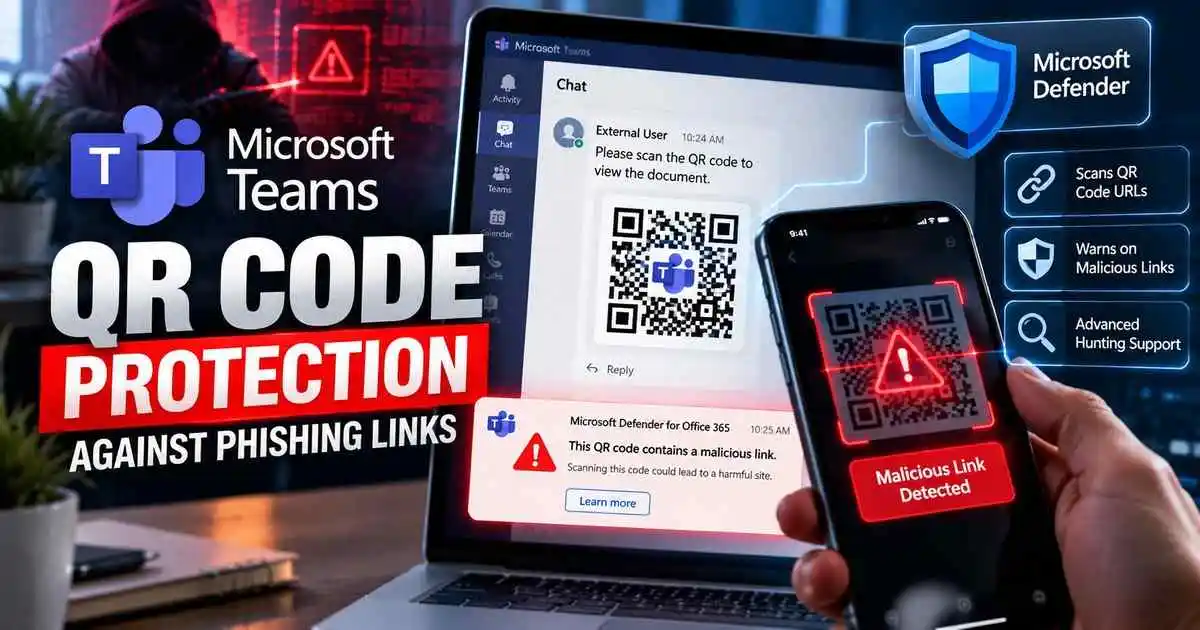
Microsoft Teams QR code protection is expanding with a new Microsoft Defender for Office 365 capability that scans URLs hidden inside QR codes and warns users when malicious destinations are detected.
The update was announced through Microsoft 365 Message Center notice MC1490905 and is rolling out worldwide from early October through early November 2026.
The protection works after a Teams message is delivered. Defender extracts the URL embedded inside a QR code, evaluates the destination and applies post-delivery protections if the link is considered malicious.
The enhancement applies to both internal and external Teams conversations and adds new visibility for security teams using Microsoft Defender XDR Advanced Hunting.
For broader protection against phishing and business account compromise, see our Consumer and Small Business Cybersecurity Defense Hub.
Key takeaway: Microsoft is not simply hiding QR images. Defender can now extract the URL inside a QR code, evaluate the destination and warn Teams users after delivery when malicious content is identified.
What Is Microsoft Teams QR Code Protection?
The new feature extends Microsoft Teams URL protection to QR-code-based threats.
Traditional URL scanning works well when a message contains a normal clickable link.
QR phishing, commonly called quishing, hides the destination inside an image instead.
Attackers often use QR codes to move victims from a monitored corporate device to a mobile browser, where the destination URL may be harder to inspect before opening.
How the New Teams QR Protection Works
According to Microsoft’s Message Center update, Teams messages containing QR codes can now be analyzed after delivery.
The protection flow works like this:
- A QR code is shared in a Teams message.
- Microsoft Defender extracts the URL encoded inside the QR image.
- The URL is evaluated against Microsoft’s threat intelligence and protection systems.
- If the destination is identified as malicious, Teams adds a warning to the affected message.
- Eligible internal messages may also be blocked through Zero-hour Auto Purge.
This allows Microsoft to evaluate the actual destination hidden in the QR image rather than relying only on visible message text.
Users Can See Warnings on Malicious QR Messages
When Microsoft identifies a malicious URL inside a QR code, users may see a warning directly on the affected Teams message.
The warning can appear in both internal and external conversations.
Microsoft’s examples show messages marked as containing potentially harmful links and, in some scenarios, messages blocked because malicious content was detected.
This does not mean every suspicious QR code will always be removed before a user sees it.
The feature is explicitly described as post-delivery protection.
Zero-Hour Auto Purge Can Block Eligible Messages
Organizations using Microsoft Defender for Office 365 Plan 1 or Plan 2 with Zero-hour Auto Purge, or ZAP, enabled may receive additional protection.
ZAP can take action on eligible malicious internal Teams messages after delivery.
Microsoft already uses ZAP to identify and neutralize phishing or malware messages after initial delivery.
The new QR capability extends that protection to malicious destinations embedded inside QR images.
Security Teams Gain Advanced Hunting Visibility
The update also improves visibility for security operations teams.
URLs extracted from QR codes will appear in the Microsoft Defender XDR MessageUrlInfo table.
Microsoft says the UrlLocation column will contain:
QRCodeThis gives SOC analysts a direct way to identify URLs that originated from QR images during threat hunting and incident investigations.
Why Advanced Hunting Support Matters
QR phishing can be difficult to investigate because the malicious destination is visually encoded rather than presented as ordinary text.
By exposing extracted QR URLs in Defender XDR, security teams can correlate QR detections with:
- User activity
- Teams conversations
- Known malicious domains
- Phishing incidents
- Related Defender alerts
- Other compromise indicators
This makes QR-based attacks easier to incorporate into existing SOC investigation workflows.
This Is Different From Teams QR Image Blurring
Microsoft is also rolling out a separate Teams security feature for QR codes sent by external users.
That feature, tracked under Microsoft 365 Roadmap ID 570439, obscures QR-code images sent by external users by default.
The recipient must deliberately reveal the image before viewing or scanning it.
The two protections serve different purposes:
- External QR image protection: reduces accidental exposure by obscuring QR images from external senders.
- Defender QR URL protection: extracts and evaluates the link encoded inside the QR code after delivery.
Organizations can therefore benefit from both user-facing caution controls and technical URL analysis.
External QR Images Will Be Blurred by Default
Microsoft’s separate external-user protection is expected to begin targeted rollout in mid-October 2026, with general availability completing later in the month.
The feature applies across Teams desktop, web and mobile clients.
When an external sender posts an image containing a QR code, the QR image is obscured until the recipient chooses to reveal it.
This introduces an extra decision point before a user scans a potentially risky code.
Why QR Phishing Is a Growing Problem
QR codes have become popular with attackers because they can conceal destinations from users and security tools.
Microsoft reported that QR-code phishing reached 18.7 million attacks in March 2026, the highest monthly level observed in at least a year.
Volumes later declined during the second quarter, but millions of QR phishing attempts continued to be observed.
The technique remains attractive because it can move the victim from an enterprise workstation to a mobile device where normal link inspection may be less obvious.
How QR Phishing Usually Works
A QR phishing message typically claims the user must take an urgent action.
Common lures include:
- Account verification
- Password expiration warnings
- Voicemail notifications
- Document review requests
- Microsoft 365 security alerts
- IT support requests
The victim scans the code using a phone and is redirected to a fake sign-in page.
The phishing site may imitate Microsoft 365, Google Workspace, Okta or another trusted authentication service.
QR Codes Can Bypass Normal Link Inspection Habits
Users have learned to hover over suspicious links or inspect browser addresses before clicking.
A QR code removes many of those familiar signals.
The encoded URL may not become visible until the user scans the image with another device.
This makes QR phishing especially useful for attackers trying to move victims away from traditional desktop security controls.
Microsoft Teams Already Has URL Protection
The QR update builds on existing malicious URL protection in Teams.
Microsoft Teams already scans URLs shared in chats, channels and meeting messages.
If a known harmful link is detected, Teams can display warnings to users.
Microsoft also says links discovered to be malicious up to 48 hours after delivery can receive warning treatment.
The QR enhancement extends this model to destinations that were previously hidden inside images.
Defender for Office 365 Adds More Teams Protection
Organizations using Microsoft Defender for Office 365 can also use additional Teams security capabilities.
These include:
- Safe Links protection
- Safe Attachments integration
- Tenant Allow/Block List controls
- Zero-hour Auto Purge
- URL click alerts
- Advanced Hunting visibility
Together, these controls help security teams respond to threats that move beyond traditional email and into collaboration platforms.
No Separate End-User Configuration Is Required
Microsoft says no separate end-user setup is required for the new QR URL analysis capability.
The feature is being added to existing Teams URL protection functionality.
Administrators should still review their current Teams protection configuration to understand how warnings and ZAP blocking will behave in their environment.
What Microsoft Recommends Administrators Do
Microsoft says administrators should prepare for the new detections by reviewing existing security processes.
Recommended actions include:
- Review Microsoft Defender for Office 365 Teams protection settings.
- Check Teams ZAP configuration.
- Inform SOC teams about the new QR detection data.
- Update threat-hunting processes to include QR detections.
- Review incident workflows for Teams-based phishing.
What Users Should Do When They Receive a QR Code
Users should still treat unexpected QR-code requests carefully even with automated protection enabled.
- Do not scan unexpected QR codes from unknown or external contacts.
- Verify urgent account requests through a trusted channel.
- Preview the destination URL before opening it when possible.
- Do not enter credentials after scanning an unexpected code.
- Report suspicious Teams messages.
- Use phishing-resistant MFA or passkeys where available.
Post-Delivery Protection Does Not Eliminate User Risk
The new feature improves detection, but it should not be treated as a guarantee that every malicious QR code will be blocked before interaction.
Microsoft describes the capability as post-delivery protection.
That means users may still encounter suspicious QR content before a final malicious verdict is available.
Security awareness therefore remains important alongside automated detection.
Why Teams Has Become a Phishing Target
Attackers increasingly target collaboration platforms because employees often trust messages that appear inside normal workplace tools.
Microsoft has documented campaigns where threat actors impersonate IT support through Teams and persuade users to grant remote access or run attacker-controlled software.
QR phishing gives attackers another way to exploit that trust by moving the victim from a Teams conversation to an external authentication page.
Frequently Asked Questions
What is Microsoft Teams QR code protection?
It is a Defender for Office 365 enhancement that extracts URLs from QR codes shared in Teams messages, evaluates them for malicious content and warns users when harmful destinations are detected.
When is the feature rolling out?
Worldwide rollout began in early October 2026 and is expected to complete by early November 2026.
Does the feature scan internal and external messages?
Yes. Microsoft says malicious QR URL warnings can appear in both internal and external Teams conversations.
Can malicious QR messages be blocked?
Eligible internal messages may be blocked through existing Teams Zero-hour Auto Purge protections when Defender for Office 365 Plan 1 or Plan 2 and ZAP are enabled.
Can security teams hunt for QR detections?
Yes. QR-extracted URLs appear in the Defender XDR MessageUrlInfo table with QRCode listed in the UrlLocation field.
Is this the same as Teams blurring QR codes?
No. QR image blurring is a separate protection for images sent by external users. The Defender capability evaluates URLs hidden inside QR codes after message delivery.
Do users need to enable anything?
No separate end-user configuration is required for the new Defender QR URL analysis capability.
What is quishing?
Quishing is phishing delivered through QR codes that redirect victims to malicious or credential-stealing websites.
Final Takeaway
The new Microsoft Teams QR code protection closes an important visibility gap in collaboration-platform phishing.
Instead of treating QR codes only as images, Microsoft Defender can now extract the URLs hidden inside them, analyze those destinations and warn users after malicious content is identified.
Combined with separate QR-image blurring for external senders, ZAP and Defender XDR hunting, Microsoft is adding multiple layers of protection against Teams-based quishing.
Users should still verify unexpected QR requests independently, especially when they involve urgent account actions or sign-in prompts.
Stay Updated on Phishing and Microsoft 365 Security
Attackers continue to shift phishing activity into collaboration platforms, QR codes and other trusted enterprise workflows.
Follow CyberUpdates365 for verified Microsoft 365 security updates, phishing alerts, account-protection guidance and enterprise threat analysis.
Official and Primary Sources
Microsoft Teams Malicious URL Protection:
Microsoft documentation for malicious URL protection in Teams
Microsoft Defender for Office 365 Teams Protection:
Microsoft Defender for Office 365 support for Teams
Microsoft Security — QR Phishing Trends:
Microsoft Q2 2026 phishing threat landscape