A newly disclosed Android malware strain called RatHat can steal banking credentials, intercept one-time passwords, capture device unlock information and maintain access even after a victim removes the visible malicious app.
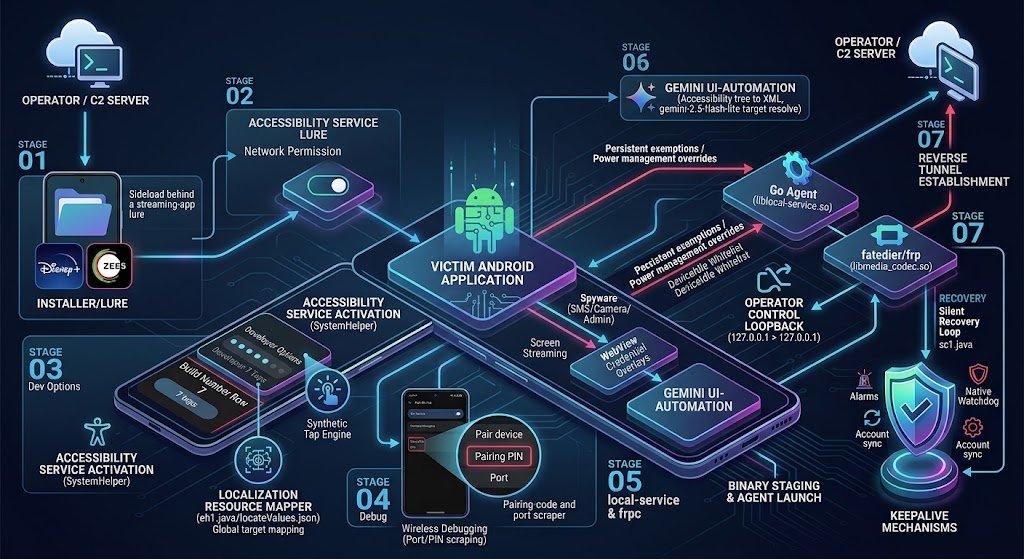
Researchers at Zimperium’s zLabs said RatHat combines Android Accessibility Service abuse with local Android Debug Bridge (ADB) pairing through Wireless Debugging. The technique allows the malware to move beyond the normal permissions available to an Android application and execute components with shell-level privileges.
The malware also uses banking and payment-app overlays, SMS and notification interception, screen monitoring and raw touch-coordinate collection to obtain sensitive information from infected phones.
For Android users, the key warning is that uninstalling the suspicious application may not be enough once RatHat has completed its persistence chain.
How RatHat Android Malware Reaches a Device
According to Zimperium, RatHat is primarily distributed through social-engineering campaigns involving smishing messages, malicious advertisements and deceptive third-party download portals.
Victims are encouraged to manually install an APK that appears to be a legitimate application. Zimperium observed builds capable of disguising themselves using recognizable application names and icons.

The infection chain depends heavily on persuading the victim to enable Android Accessibility permissions. Once Accessibility access is available, the malware can automate interactions with system settings and continue preparing the device for deeper compromise.
This is another example of why users should avoid installing APK files obtained through unsolicited messages, advertisements or unknown third-party websites. Our device security audit guide covers additional checks that can help identify risky phone settings and application behavior.
RatHat Abuses Wireless Debugging for Shell-Level Access
One of RatHat’s most significant techniques involves Android’s legitimate Wireless Debugging feature.
After obtaining Accessibility access, Zimperium found that the malware can automate the process of opening Developer Options, enabling Wireless Debugging and navigating to Android’s ADB pairing interface.
It can then read the temporary pairing code and dynamic port shown on the screen and use an embedded ADB implementation to pair with the phone’s local ADB service.
This is important because the resulting ADB session gives RatHat access to the Android shell context, which has capabilities beyond those normally granted to a standard application.
The technique does not mean RatHat remotely breaks into an untouched Android phone without user interaction. Initial infection still relies on social engineering, installation of a malicious package and the granting of powerful permissions.
Two Native Components Keep the Attack Running
Zimperium identified three major parts in RatHat’s architecture: the malicious Android application, a Go-based local agent and a reverse-proxy component.
- Malicious Android app: Handles social engineering, permission acquisition, overlays, data interception and the initial infection workflow.
liblocal-service.so: A Go-based local agent staged after ADB shell access is obtained. It can execute commands from the shell context and manage persistence and system settings.libmedia_codec.so: A disguised Fast Reverse Proxy client used to create a persistent tunnel between the compromised device and attacker-controlled infrastructure.
The local agent communicates through a loopback HTTP service, while the reverse-proxy component can expose internal device services through an outbound tunnel.
Why Uninstalling RatHat May Not Remove the Infection
RatHat’s persistence mechanism makes the malware particularly difficult to remove once the full infection chain has completed.
The Android application can interfere with the normal uninstall workflow by presenting a fake failure interface. More importantly, Zimperium found that the Go-based local agent runs outside the normal lifecycle of the original application.
If the visible package is successfully removed, the separate agent can remain active in the shell context, detect that the application is missing and reinstall the staged APK while restoring important permissions.
This means a victim may believe the threat has been removed while a background component continues operating on the device.
Users who suspect this level of compromise should therefore avoid assuming that a normal application uninstall has fully cleaned the phone.
RatHat Can Steal Banking Credentials and OTP Codes
RatHat includes several credential-stealing mechanisms designed around mobile banking, cryptocurrency and payment applications.
The malware can monitor which application is currently in the foreground and display attacker-controlled HTML interfaces over selected financial applications. These fake screens are designed to resemble legitimate login or payment interfaces and capture credentials entered by the victim.
Zimperium also found embedded overlays targeting payment applications including WeChat and Alipay.
At the same time, RatHat can monitor SMS messages and notifications to obtain one-time passwords and other verification codes. That combination can give attackers both the primary account credentials and a secondary authentication factor.
Raw Touch Monitoring Can Reveal PINs and Unlock Patterns
RatHat does not rely entirely on traditional keylogging or Accessibility text capture.
Researchers found that it can monitor raw device input coordinates and compare those touch positions with stored keypad and pattern-lock layouts.
Knowing where a victim touched a specific phone’s PIN keypad can allow the malware to determine which digit was pressed. Similar coordinate analysis can be applied to Android’s pattern-unlock grid.
This technique can remain useful in situations where an application limits normal screenshots or hides sensitive text from Accessibility services.
CyberUpdates365 has previously covered another Android threat using advanced interaction techniques in our report on Herodotus Android malware.
RatHat Uses Generative AI for UI Automation
Zimperium also identified a generative-AI-assisted automation component inside RatHat.
The malware can serialize information from the Android Accessibility interface and send it to a generative AI service for narrowly defined interface-navigation tasks.
According to the researchers, these tasks can include identifying the coordinates of a named screen element, determining the text displayed by a particular element and deciding when an interface should be scrolled.
The important distinction is that the reported AI component primarily assists RatHat’s ability to navigate changing device interfaces. The underlying credential theft, shell access and persistence mechanisms are implemented separately in the malware.
What Android Users Should Do
The strongest protection against RatHat begins before the APK is installed.
- Install applications from trusted sources: Avoid APK files distributed through unsolicited text messages, advertisements, forums or unknown websites.
- Question Accessibility requests: A normal application should have a clear and legitimate reason before receiving Accessibility access.
- Check Developer Options: Investigate unexpected activation of Developer Options or Wireless Debugging.
- Review Accessibility Services: Disable unfamiliar services that should not have control over the device interface.
- Protect financial accounts: If compromise is suspected, contact your bank using another trusted device and review recent account activity.
- Change exposed credentials elsewhere: Password changes should be performed from a known-clean device rather than the potentially infected phone.
Users can also follow the checks in our Smartphone Security Audit 2026 to review high-risk settings and common signs of phone compromise.
What Banks and Security Teams Should Watch For
RatHat is also relevant to financial institutions and organizations that allow sensitive applications to run on unmanaged Android devices.
High-risk indicators can include unexpected Accessibility automation, active Wireless Debugging, suspicious overlay behavior, screen-capture activity and application sessions originating from a device where developer functionality has been unexpectedly enabled.
Because RatHat can intercept SMS and notification content, organizations should not assume that possession of an SMS one-time password alone proves that a transaction originated from the legitimate account holder.
Higher-risk transactions may require additional device-risk checks or independent verification when signs of mobile compromise are present.
RatHat Indicators and Artifacts
Zimperium’s technical analysis identified several artifacts associated with RatHat. These indicators should be interpreted together with device behavior rather than treated as proof of compromise on their own.
| Type | Indicator | Purpose |
|---|---|---|
| File | liblocal-service.so | Go-based local agent operating from the ADB shell context |
| File | libmedia_codec.so | Disguised Fast Reverse Proxy client |
| Path | /data/local/tmp/app.apk | Staged APK used by the persistence mechanism |
| File | local-service.update | Staged local-agent update artifact |
| File | server_config.json | Configuration used by the malicious application |
| File | svc_config.html | HTML content used in the Accessibility social-engineering workflow |
| File | locateValues.json | Stores keypad and pattern-layout information used with touch coordinates |
| Local service | 127.0.0.1:7910 | Loopback HTTP service associated with the Go agent |
| ADB artifact | cert.pem | ADB certificate material handled by the malware |
| ADB artifact | private.key | ADB private-key material handled by the malware |
CyberUpdates365 Analysis
RatHat is significant less because of any single credential-stealing feature and more because of how several Android capabilities are combined into one infection chain.
Accessibility abuse gives the malware control over the user interface. Wireless Debugging provides a route into the local ADB shell. Separate native processes then allow persistence outside the visible application’s lifecycle, while overlays, OTP interception and raw-input monitoring provide multiple independent methods of obtaining financial credentials.
The AI-assisted component adds adaptability to interface automation, but the more immediate defensive concern is the malware’s abuse of legitimate Android administrative and debugging features after a user has been socially engineered into granting initial access.
Zimperium linked the campaign to threat actors that it said appear to be operating in China. That assessment should be treated as researcher attribution rather than proof of state sponsorship or government involvement.
For users who believe RatHat or a similar threat has gained shell-level persistence, simply deleting the suspicious application should not be considered sufficient evidence that the device is clean.
Source
This report is based primarily on technical research published by Zimperium zLabs on September 16, 2026.